XLSX viewer
XLSX viewer: open Excel spreadsheets without Excel
Drop an Excel file here and every sheet appears as a table, with a tab for each one. The XLSX viewer runs in your browser, so the numbers stay on your device.
Sending it to someone? Share it as a tracked link.
How to view an XLSX file online
See an Excel file in three steps
No Excel, no account, and nothing to install.
-
Step 1
Choose the spreadsheet
An .xlsx from Excel, an older .xls, or an .ods from LibreOffice all work.
-
Step 2
Switch between sheets
Each sheet gets a tab above the table. Row numbers stay on the left as you scroll.
-
Step 3
Check it, then decide
Read the figures, or open the file in a full spreadsheet program to edit.
What an XLSX file is
XLSX is the spreadsheet format Excel has used by default since Excel 2007. Like a Word .docx, it is a zip archive of XML parts, one per sheet plus shared parts for text, styles and charts, defined by the ECMA-376 standard. The Library of Congress describes it in its format record for XLSX. So "is XLSX the same as Excel?" is close to yes: it is Excel's own file format, but other programs read it too.
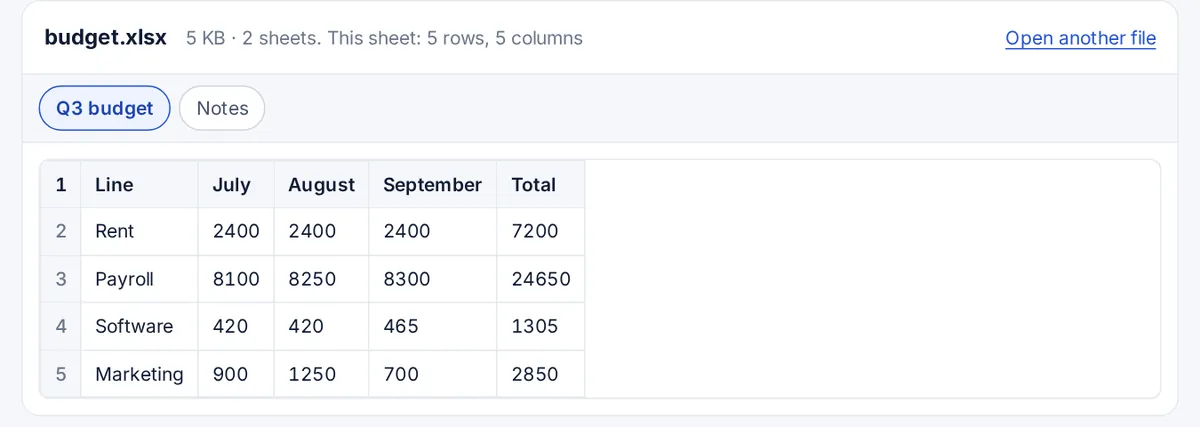
What you see, and what you do not
The viewer is built on SheetJS. It shows the value in every cell, formatted the way the workbook formats it, such as dates and currency. A formula cell shows the result Excel saved with the file. The viewer does not recalculate, so a file saved by a program that never calculated it can show blank results. Charts, pictures, conditional colours and cell borders are not drawn, and macros in an .xlsm file are never run. Up to 2,000 rows and 100 columns are shown per sheet.
XLS, XLSX and ODS
- .xlsx is the modern Excel format and the one most files use.
- .xls is the Excel 97 to 2003 binary format. The viewer reads it as well.
- .ods is the OpenDocument spreadsheet from LibreOffice and OpenOffice, also supported.
Opening XLSX files without Excel
Besides this viewer: Google Sheets imports .xlsx files, Numbers on a Mac opens them, and the free LibreOffice Calc opens and edits them on Windows, Mac and Linux. When Excel itself refuses a file, the cause is usually a damaged download or an .xlsx that is really a CSV or an HTML page with the wrong extension. A viewer that shows nothing for a sheet confirms that the sheet is empty, not that Excel is broken.
FAQ
XLSX viewer questions
How do I view an XLSX file?
Drop it on the box at the top of this page. Every sheet appears as a table with its own tab. For editing, use Excel, Google Sheets, Numbers or LibreOffice Calc.
Can you open XLSX files without Excel?
Yes. This viewer reads them in the browser, and Google Sheets, Numbers and LibreOffice Calc all open .xlsx files for free.
Why can't I open an XLSX file in Excel?
Common reasons: the file did not finish downloading, it is protected with a password, it was made by a newer program than your Excel, or it is a different kind of file renamed to .xlsx. Opening it here shows whether the content is readable at all.
Is XLSX the same as Excel?
XLSX is the file format Excel saves by default. Excel is the program. Other programs can read and write XLSX too.
What programs can open XLSX files?
Microsoft Excel, Google Sheets, Apple Numbers, LibreOffice Calc, and browser viewers such as this one.
Do formulas and macros work here?
Formula results that were saved in the file are shown. Formulas are not recalculated, and macros are never run, which also makes it a safe way to look inside a spreadsheet you did not expect.
More viewers