Redact a PDF
Redact a PDF: find and remove personal data automatically
One click finds the emails, phone numbers, ID numbers and card numbers in your PDF, even on scanned pages. Review the list, black it out, and download a redaction report for your records. Free, and nothing is uploaded.
- Finds personal data automatically
- Audit report for GDPR, FOI and records requests
- Works on scanned PDFs
- Nothing uploaded. Free, no account
How to redact a PDF
Personal data out in three steps
Works in Chrome, Edge, Firefox and Safari, on a computer, a Chromebook or a phone.
-
Step 1
Choose one PDF or several
The pages are drawn below the box, on this device only. Scanned pages are spotted and can be read too.
-
Step 2
Find, review, black out
Press Find personal data, untick anything that should stay, add your own words, and draw boxes over anything else.
-
Step 3
Download the PDFs and the report
Each PDF comes back with the text under the boxes removed, plus a report of what was redacted, page by page.
What it finds automatically
Press Find personal data and every page is searched for the types below. Number types are checked with the same rules banks and governments use, so a random string of digits is not flagged as a card or an ID by mistake. Everything found is listed for you to review before anything is blacked out.
| Type | Looks like | How a false match is avoided |
|---|---|---|
| Email addresses | name@school.edu | Must have a name, an @ and a domain ending |
| Phone numbers | +1, +44, +91, +63 and other country codes; 10 or 11 digit local numbers | Needs a full phone-length number, so short numbers and amounts are skipped |
| Dates of birth | 12/03/2011, 3 March 2011, March 3, 2011 | A date counts as a birth date when "born", "birth" or "DOB" is written just before it |
| Other dates | Any date | Off by default, because most dates in a document are not personal |
| US Social Security numbers | Three digits, two, four | Number ranges that are never issued are ignored |
| UK National Insurance numbers | Two letters, six digits, one letter | Letter pairs that are never used are ignored |
| India Aadhaar numbers | 12 digits, often in groups of four | The Verhoeff check digit must be right |
| India PAN numbers | Five letters, four digits, one letter | The fourth letter must be a valid holder type |
| Card numbers | 13 to 19 digits | The Luhn check digit that every card number carries must be right |
| IBAN bank account numbers | Country code, check digits, account | The IBAN checksum must be right |
| Your own words | A name, a case or student number | Found wherever it appears, whatever the capital letters |
Automatic search is a strong first pass, not a guarantee. Names, addresses and anything written in a way these rules do not expect still need your eyes: add names to Also find these words, look through every page, and draw boxes over anything else.
A redaction report for your records
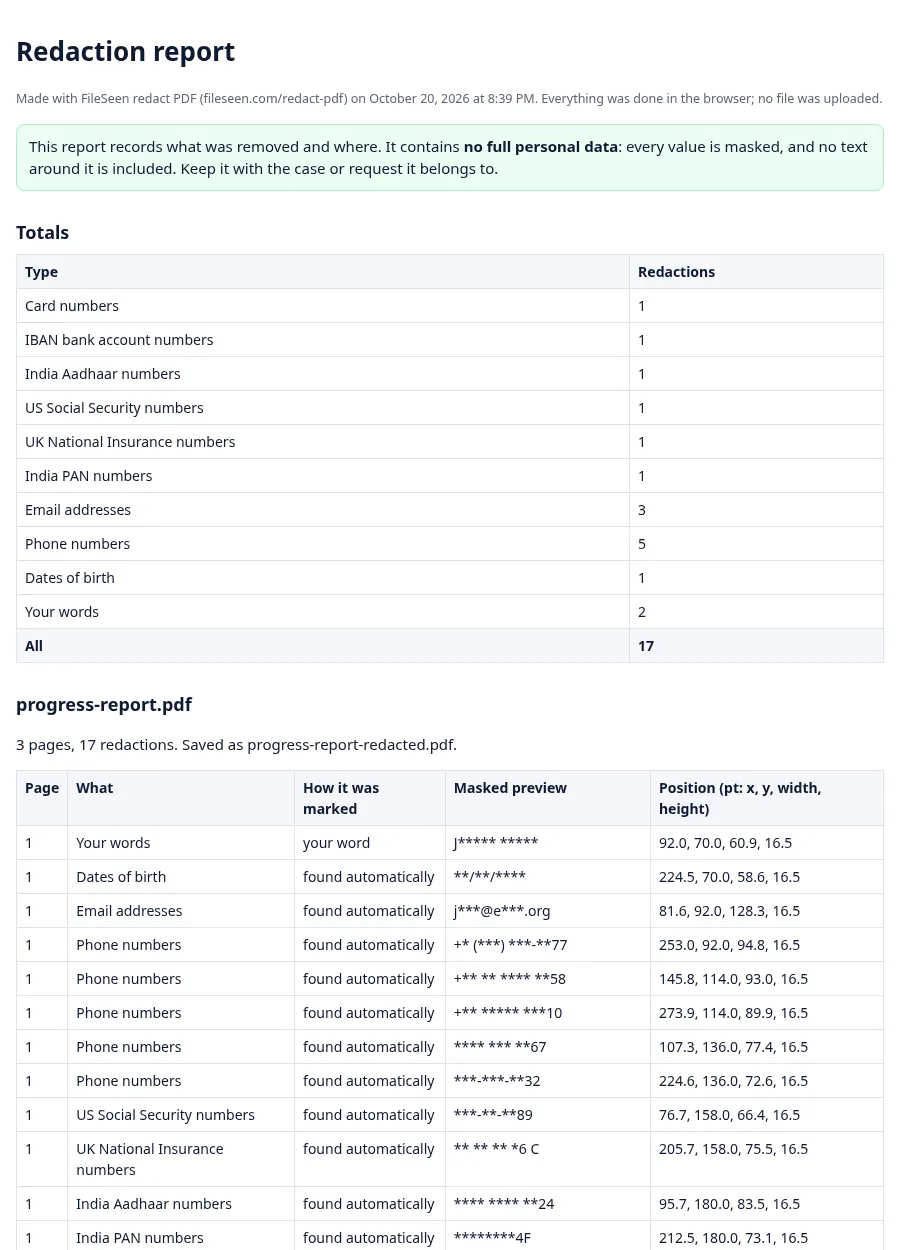
Every download comes with a report that lists each redaction: the file, the page, what kind of data it was, whether it was found automatically, read from a scan or drawn by hand, and where on the page it sat. It comes as a readable page and as a CSV file for a spreadsheet or a case system.
The report contains no full personal data. Each value is masked, so an email becomes something like j***@e***.org and a number keeps only its last two digits. That makes it safe to keep with the request it belongs to: a GDPR subject access request, a Freedom of Information request, a public records request or a court disclosure. It shows what was withheld and where, without repeating it.
Real redaction, not black boxes on top
The usual mistake is to draw a black rectangle over a name and save. The rectangle is a shape lying on top of the page; the name is still in the file underneath it. Court filings and public reports have leaked exactly this way.
| Question | A black box drawn on top | Redacted here |
|---|---|---|
| Is the hidden text still in the file? | Yes | No |
| Can someone copy and paste it? | Yes | No |
| Does a search find it? | Yes | No |
| Does moving or deleting the box reveal it? | Yes | No, the box is part of the page picture |
| Title and author details | Left in the file | Cleared |
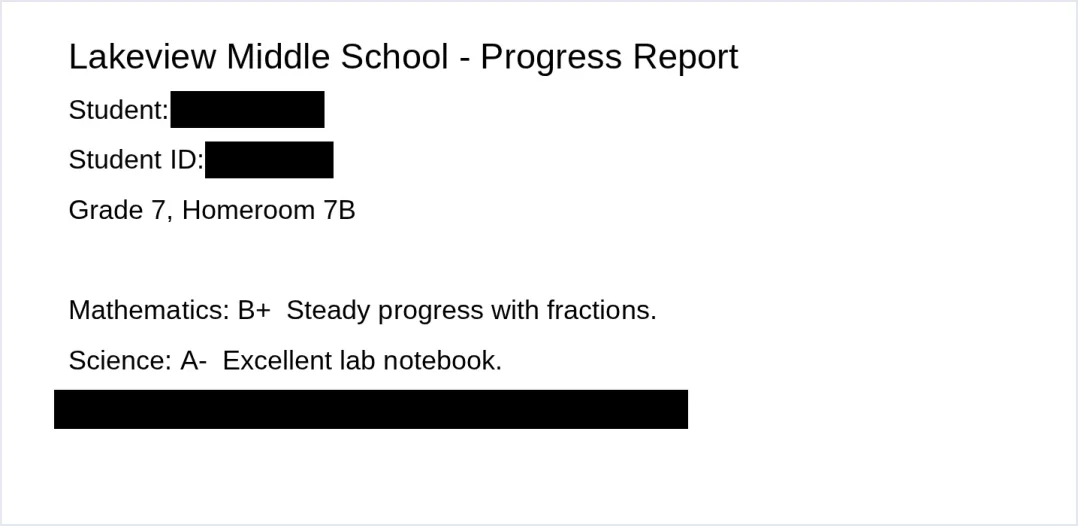
How it works: every page that has at least one box is drawn as a picture at 200 dots per inch, the boxes are painted into that picture, and the page is rebuilt from the picture. The text, fonts and hidden layers of that page are not copied. Pages without a box are copied across unchanged.
With Keep the other text selectable switched on, the words on a redacted page that do not touch any box are written back as invisible text over the picture, so the rest of the page can still be selected and searched. Words under a box are never written back, and a word that is only partly covered is left out whole. Untick the option to get picture-only pages.
Scanned PDFs too
A scanned page is a photo of paper, so it has no text to search. When a PDF has pages like that, the tool says so and offers Read scanned text. The text is read on your device with an open-source reading engine (about 7 MB, loaded once, only when you press the button), then Find personal data works on those pages as well.
Be honest with yourself about scans: faint copies, stamps, tables and handwriting are often misread, and a misread number is not found. After reading a scan, look over every scanned page and draw boxes over anything that was missed.
Several PDFs at once
Choose or drop up to 20 PDFs together. Find personal data searches all of them with the same settings and your own words, and each file can be reviewed on its own tab. The download gives every redacted PDF, a zip of them all, and one combined report.
For schools: student records
Sharing a sample essay, a grade report or an incident note outside the school often needs the student's name, ID and contact details removed first. In the US, the Department of Education's Student Privacy Policy Office publishes guidance on what counts as personally identifiable information under FERPA. Because this tool never uploads the file, the record is not handed to another service while you redact it.
For privacy, FOI and records officers
Answering a subject access request or a Freedom of Information request often means releasing documents with third-party details removed. The UK Information Commissioner's Office explains what may be withheld. Redact here, keep the report with the request, and the record of what was removed is done in the same step.
For nonprofits: reports and case files
An annual report draft, a grant file or a client case summary often carries donor names, home addresses or case numbers. Redact those before a document goes to a board, a funder or a public website, and keep the full version where it belongs.
Check the result before it leaves
- Open each downloaded copy and look at every page, not just the first.
- Search the copy for each name and number you removed (Ctrl+F or Cmd+F). It should find nothing.
- Try to select text under a black box: nothing should highlight there.
- Rename the file if its name gives away who it is about.
FAQ
Redact PDF questions
How can I redact a PDF for free?
Choose the PDF at the top of this page, press Find personal data or draw boxes, and download the redacted copy and its report. There is no sign-up and no limit, and the PDF stays on your device.
How do I black out text on a PDF?
Black out text by removing it, not by covering it. Here, a page with a box is rebuilt from a picture with the box painted in, so the text under the box is no longer in the file.
What is the best way to redact a PDF?
Use a tool that removes the content rather than drawing over it, search the document for personal data instead of relying on your eyes alone, keep a record of what was removed, then check the result. Keep the unredacted original private.
Is there a way to redact text in PDF?
Yes. Press Find personal data to mark emails, phone numbers, ID and card numbers, type names into Also find these words, or draw a box over anything by hand.
Can it find personal data automatically?
Yes. It finds email addresses, phone numbers, dates of birth, US Social Security numbers, UK National Insurance numbers, India Aadhaar and PAN numbers, card numbers and IBANs, and checks the numbers with their check-digit rules. You review every item before it is blacked out.
Does it work on scanned PDFs?
Yes. Pages without a text layer are spotted, and Read scanned text reads them on your device. Scans can be misread, so check every scanned page and draw boxes over anything missed.
What is in the redaction report?
Each redaction with its file, page, type, how it was marked and its position, plus totals. Every value is masked, so the report itself holds no full personal data.
Can I redact several PDFs at once?
Yes, up to 20 at a time. They are searched with the same settings and come back as separate PDFs, a zip and one combined report.
Is my PDF uploaded?
No. The PDF is read and redacted inside your browser tab. The page loads its tools from fileseen.com, and no file content is sent anywhere.
Why won't Adobe Acrobat let me redact?
Redaction is part of the paid Acrobat Pro. The free Acrobat Reader can add comments and shapes, which only cover text. This page redacts without Acrobat.
How to redact on Windows?
Open this page in Edge, Chrome or Firefox and redact the PDF here. The PDF reader built into Edge can draw on a page, but drawing only covers the text and leaves it in the file.
How to blur in PDF?
For hiding information, a solid black box is safer than blur. Blurred text can sometimes be guessed or partly restored, while a black box carries nothing. This tool uses solid boxes for that reason.
More from FileSeen