Flyer QR code
Flyer QR code: put the full details behind a scan
A flyer has room for a headline, a date and a place. Upload everything else as a PDF or image, print the QR code on the flyer, and see how many people scanned it.
Swap the file anytime. The printed QR code keeps working.
Uploading. Keep this page open.
Where should the code go?
File uploaded. Enter your email to get your link.
Enter the code
Sent to . It expires in 10 minutes.
Your link is ready
Free: every feature on 3 links, including who opened it and time on each page.
Opening it from here does not count as an open.
See when it is seenYour private stats page. Keep it to yourself: anyone with it can see the stats.Both links are in your email too. Upgrade to Pro.
How to add a QR code to a flyer
From upload to a printed flyer in three steps
Keep the flyer itself short and let the scan carry the detail.
-
Step 1
Upload the detail page
The event program, parking map, class timetable or full job description, as a PDF or a photo.
-
Step 2
Drop the code into your design
Save the QR code PNG and place it in your flyer file, with a line such as "Scan for the schedule".
-
Step 3
Post the flyers and watch the scans
Every scan opens the link, and the stats page counts it by day and by country.
What to put behind a flyer QR code
The scan works best when it opens something the flyer could never fit. A few examples that work well:
- Events: the full schedule, the speaker list, parking and a map of the venue.
- Lost pets: more photos, the last place the pet was seen and who to call.
- Open houses: the floor plan, room sizes and the disclosure sheet.
- Classes and clubs: the term timetable, fees and what to bring.
- Hiring: the full job description and how to apply.
Design rules that make a flyer code scan
- Size it for the distance. A common rule of thumb is a code about one tenth as wide as the scanning distance: 3 cm (1.2 in) for a flyer read at arm's length, much larger for a poster across a hallway.
- Leave a clear margin. The QR code standard asks for an empty border four modules wide on every side, the quiet zone described by Denso Wave, which invented the format.
- Dark on light. Black on white scans most reliably. Avoid printing the code over a photo.
- Say what the scan gives. "Scan for the full schedule" gets more scans than a bare code.
- Test the proof. Scan the printed proof with your own phone before the full print run.
Find out which flyer spot works
Make one link per location and print a different code on each batch: one for the coffee shop board, one for the library, one for the door handouts. Each code has its own stats page, so after a week the open counts show which spot people actually stop at. The free plan has 3 links, which is enough to compare three locations.
An open is counted each time the link is opened, with its day and country. FileSeen does not identify the person who scanned, so think of the numbers as interest per location, not a list of people. Your own test scans from the preview link are never counted.
FAQ
Flyer QR code questions
Can I create a QR code for a flyer?
Yes. Upload the page you want people to see at the top of this page, confirm your email with the 6-digit code, and save the QR code image. Place it in your flyer like any other picture.
How do I scan a QR code on a flyer?
Open the phone camera and point it at the code for a second. A banner with the link appears; tap it and the page opens in the browser. No scanner app is needed on current phones.
What is the FBI warning about QR codes?
In January 2022 the FBI warned that criminals were tampering with QR codes, for example by sticking a fake code over a real one. Print your code into the flyer design rather than on a sticker, and check posted flyers now and then.
Can you provide an example of a QR code flyer?
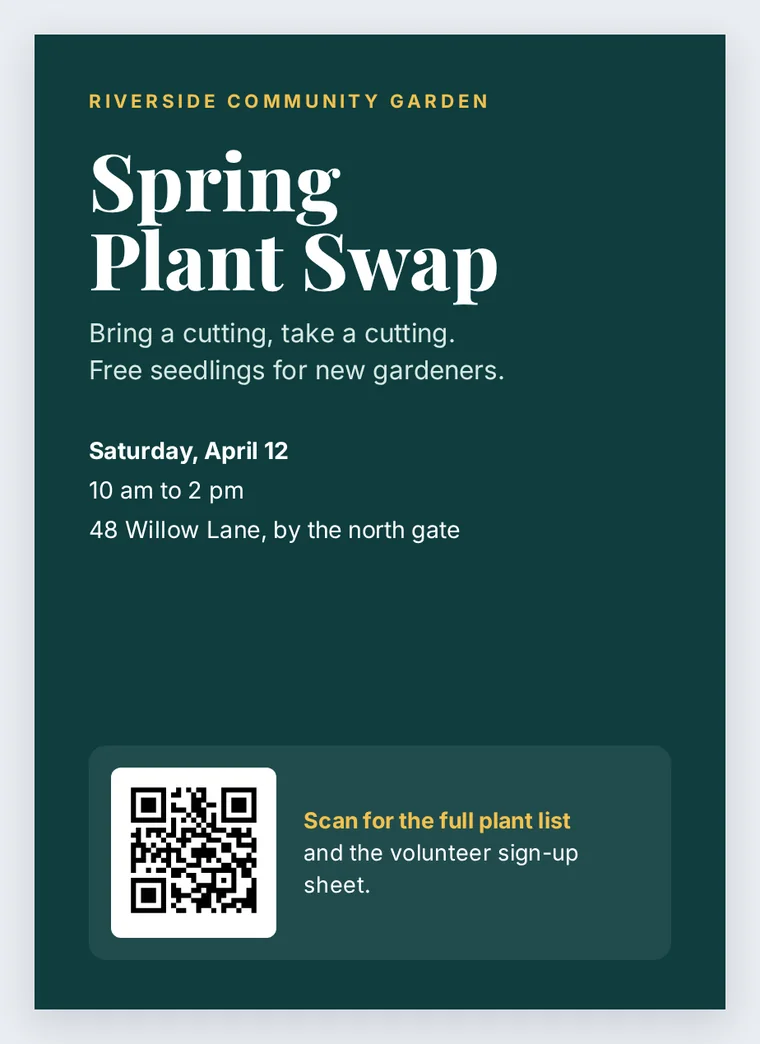
The sample on this page is one: a short flyer with the headline, date and place, and a code that opens the full plant list and the volunteer sign-up sheet.
Can I change what the code opens after the flyers are printed?
Yes. Replace the file at the same link, so the printed code opens the new version. This works on the free plan too.
More QR codes