Donation QR code
Donation QR code: the full ask, one scan away
Upload your one-page appeal as a PDF or image, print the QR code on posters and event tables, and see how many people scanned it, on which days and from which countries.
Swap the file anytime. The printed QR code keeps working.
Uploading. Keep this page open.
Where should the code go?
File uploaded. Enter your email to get your link.
Enter the code
Sent to . It expires in 10 minutes.
Your link is ready
Free: every feature on 3 links, including who opened it and time on each page.
Opening it from here does not count as an open.
See when it is seenYour private stats page. Keep it to yourself: anyone with it can see the stats.Both links are in your email too. Upgrade to Pro.
How to set up a QR code for donations
From appeal to printed code in three steps
FileSeen shows a document when the code is scanned. It does not take payments.
-
Step 1
Upload the one-page appeal
What you are raising money for, what each amount does, and every way to give.
-
Step 2
Print the code
On the event poster, the table card, the newsletter or the back of a program.
-
Step 3
Watch the scans
Each scan is counted by day and country, so you can see which event or poster drew interest.
A code that explains before it asks
If you already have an online giving page, a QR code can simply open that page. A FileSeen code fits a different job: people scan, read why the money matters, and then choose how to give. That suits a capital campaign, a scholarship appeal, a disaster relief drive or a church building fund, where one page of context raises more than a bare payment form.
What to put in the appeal:
- One line on the need, in plain words, with one number: "38 families on the waiting list".
- What each amount does: $25 buys a week of meals, $100 a month of tutoring.
- Every way to give: the web address of your giving page, how to give by check and where to send it, and a contact name.
- A thank you and how donors will hear about the result.
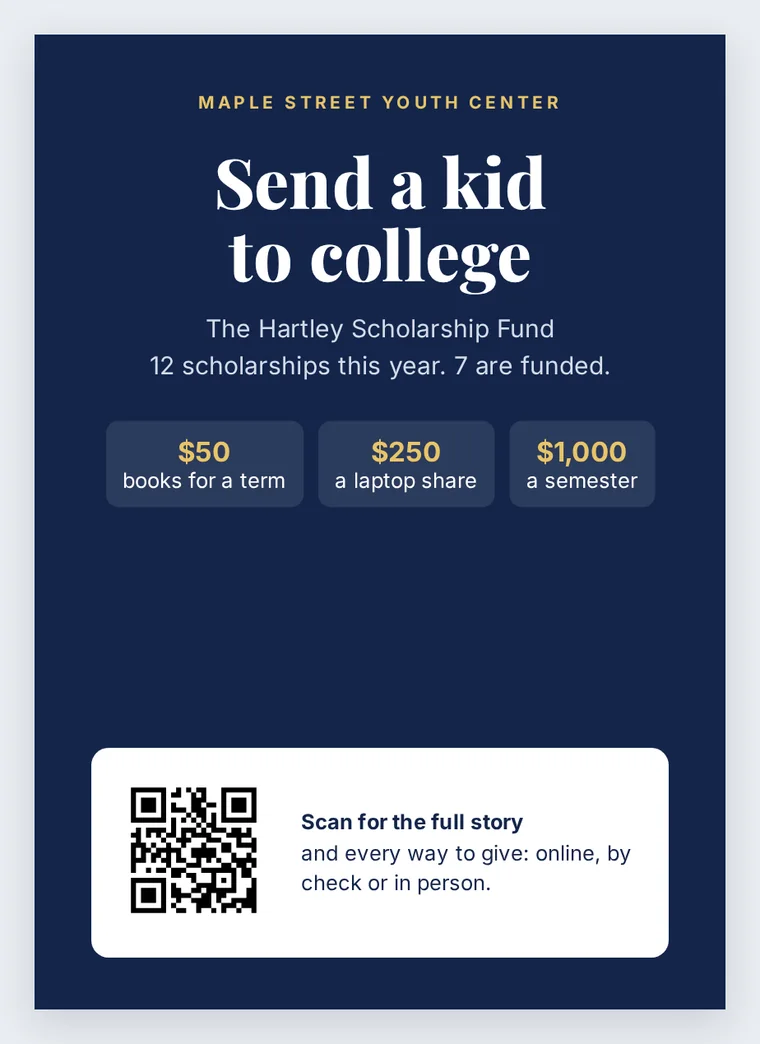
Where donation codes get scanned
- Event tables and gala programs: the moment people are most willing to give.
- Posters in a lobby or a shop window, printed large enough to scan from a few steps away.
- Printed newsletters and annual reports, where a code is easier than typing a long web address.
Use one link per place to compare them: one for the gala, one for the lobby poster, one for the newsletter. The free plan has 3 links, and each has its own count of opens.
Keep donors safe
Scam QR codes stuck over real ones are a known problem; the FBI has warned about tampered QR codes. Print the code into the poster design rather than on a sticker, show your organisation's name and web address next to it so people can check, and look over posters in public places now and then. FileSeen counts opens but does not identify who scanned, so donors are not tracked as people.
FAQ
Donation QR code questions
How to set up a QR code for charity donations?
Write a one-page appeal with every way to give, upload it at the top of this page, confirm your email with the 6-digit code, and save the QR code image for your poster or program.
How to ask for donation template?
Keep it to one page: the need in one sentence with one number, what each gift amount does, how to give, who to contact, and a thank you. Upload that page here and print the code.
How do I scan a QR code and send it?
Point your phone camera at the code and tap the link that appears. To pass it on, share the link that opens, not a photo of the code.
How do I obtain a QR code?
Upload a PDF or image here and FileSeen makes a QR code for it, saved as a PNG. It is free for up to 3 codes.
Can the QR code take payments?
No. FileSeen shows the document; giving happens on your own giving page, by check or in person, as the appeal explains.
More QR codes