Share a file as a link Free
Upload a document and get a link that opens in any browser. The reader needs no account or app.
Homepage or dashboard uploader.
Features
What each feature does, where to turn it on, and which plan includes it. Free has every feature on 3 links; Pro adds unlimited links.
Readers open your links in any browser, with nothing to install. Documents render with PDF.js, the open-source reader built into Firefox, and Slack alerts use Slack's own incoming webhooks.
Upload a document and get a link that opens in any browser. The reader needs no account or app.
Homepage or dashboard uploader.
PDF, PowerPoint, Word and Excel, plus images, audio, text and EPUB, up to 95 MB per file.
Automatic.
Word, PowerPoint and Excel files are shown as pages in the browser, with nothing to install.
Automatic.
Choose the words in the link's address, such as q4-proposal.fileseen.page.
Ready card, Link settings, Link name.
Save a QR code image that opens the link on any phone.
Ready card.
A link pasted into a chat or social post shows a title and preview image.
Automatic.
Opening your own link from the ready card or your browser is not counted as an open.
Automatic.
No password: a 6-digit code to your inbox confirms it is you.
Any upload or Log in.
Make another link to the same file, each with its own name and stats.
Dashboard, Files.
Upload an HTML file or a zip of a site and share it as a page.
Uploader, with a confirmed account.
Every open and download, with the reader's country.
On for every link.
The site that sent each reader, such as LinkedIn or Gmail.
Stats page.
How long the document was open and active. Idle time and hidden tabs are not counted.
On for every link.
When each visit happened, the country, downloads, and whether the reader came back.
Stats page or Analytics.
Opens and reading across all your links on one page.
Dashboard, Overview.
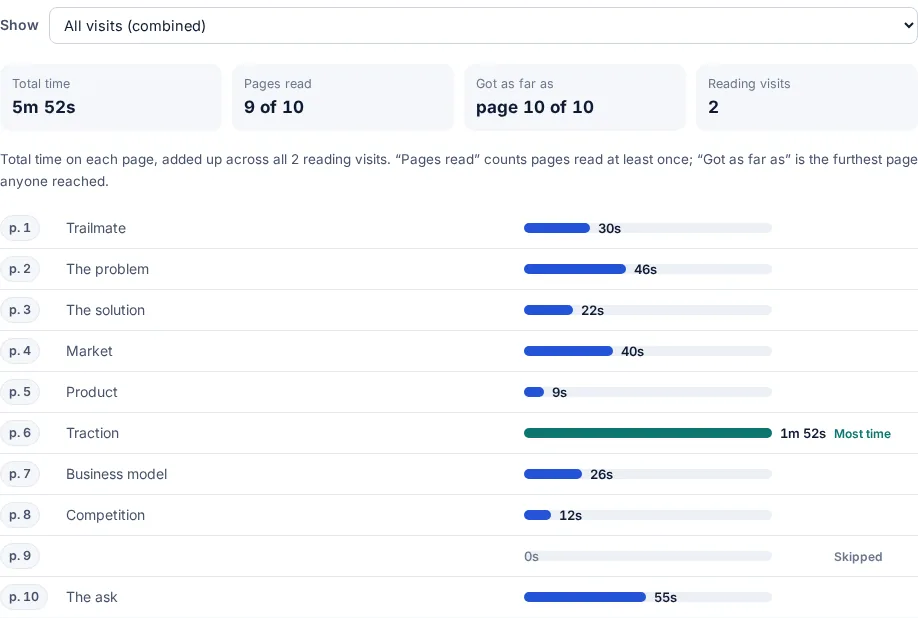
Visit by visit, how long each page was read and how far each reader got.
Stats page.
Pages are labelled from their headings, and you can tag them, such as Price or Terms.
Stats page, Time on each page.
The reader's name or email, from a confirmed email, a form or a personal link.
Turn on the email step, or use one link per person.
The device and browser of each visit.
Stats page, each visit.
Download every visit as a spreadsheet.
Analytics, Download CSV.
Up to 400 files behind one link, with one address to send.
Link settings, Add files.
Readers switch between a list, thumbnails and a slideshow of the files.
Automatic on a data room.
Move files up or down, add or remove them. The link and stats stay.
The file list on the link's page.
Opens and reading time for each file, time on every page of each PDF, and which files each visitor opened.
The file list on the link's page.
Limit a link to named emails or a whole company domain, such as @acme.com.
Link settings, Only listed people.
One password, email check and expiry date cover every file in the room.
Link settings.
Visitors enter it before the file opens.
Link settings, Password.
The link stops working after 1, 7 or 30 days. Set a default for new links.
Link settings, Expiry; Settings for the default.
No download button, printing blanked, right-click off, the raw file not served. PDFs start view-only.
Link settings, Downloads off.
Allow downloads per link, or by default for new links.
Link settings, Downloads; Settings for the default.
Pause a link without deleting it. Readers see a neutral page.
Link settings, Link on or off.
The link stops working for everyone at once.
Dashboard or stats page.
Readers can report a link that looks harmful.
Automatic.
Uploads are checked for scams and phishing before they go live.
Automatic.
The reader's confirmed email and the date drawn across every page of a PDF.
Link settings, Watermark.
A line in your words the reader must tick before the file opens.
Settings, Branding.
The reader types an email before the file opens.
Link settings, Email before opening.
The reader confirms the email with a code sent to their inbox.
Link settings, Email before opening.
Also ask for a name, company or phone number.
Link settings; Settings, Branding for phone.
Paste a list or CSV and get a personal link for each person, with a CSV back for your mail merge.
Dashboard, the link's menu, One link per person.
Add ?to=their@email.com to a link and that reader's visits show under their address.
Add it to the link in your email tool.
Readers leave their details on the page.
Link settings, Contact form.
An email every time the link is opened. This is the default.
The switch on the ready card, or Link settings.
Fewer emails: only the first open, or one summary a day.
Link settings, Open emails; Settings for the default.
One line in a Slack channel when someone new opens a link: file, who (if confirmed) and country.
Settings, Slack alerts.
An email when a reader spends 30 seconds on a page tagged Price or Terms.
Stats page, tag the page.
After you replace a file, readers who were there before see "Updated 2 hours ago".
Automatic when you replace a file.
Swap in a new version; the link, its printed QR code, settings and stats stay.
Link settings, Replace the file.
A signed POST to your own system on every open.
Settings, Webhook on open.
Open emails to the sender, one teammate or the whole team.
Link settings, Team emails.
Your logo on the viewer and the email page.
Settings, Branding, or Link settings, Logo.
Links on an address such as docs.yourcompany.com.
Settings, Custom domain.
Your heading, message, button text, colour and image on the page readers see first.
Settings, Branding.
A button that sends readers to your site or booking page.
Link settings, Button on the page.
Call, email, WhatsApp or booking buttons in a bubble on the page.
Link settings, Contact form.
The "Shared with FileSeen" badge is removed from your links.
Link settings, FileSeen badge.
Every team link, with who made each.
Dashboard, team switcher.
Owners, admins and members, with a record of who changed a teammate's access.
Team settings.
The team's brand on every team link.
Team settings.
When someone leaves, their links stay.
Automatic.
Choose expiry, downloads and open emails once for every new link.
Settings.
Removes every link, file and stat.
Settings, Account.
Every feature on 3 links ever created, files up to 95 MB. Deleting a link does not free a slot.
Automatic.
No account. Protect, convert and viewer tools run in your browser; the file is never uploaded.
Free has every feature on 3 links, with no time limit. Deleting a link does not free a slot. Pro is $12 a month or $99 a year for unlimited links. Team is $29 a month for 3 people. Compare plans.
FAQ
Yes, on every plan. FileSeen shows how long each page or slide was read, visit by visit, and how far each reader got.
Yes, on every plan. One link can hold up to 400 files, with reading time per file, an allow list of emails or company domains, and one password and expiry for the set. There are no folders or per-file permissions.
Yes, on every plan. Paste a Slack incoming-webhook address in Settings and FileSeen posts a line when someone new opens one of your links.
Yes, on every plan. PDF links start view-only: no download button, printing blanked, and the raw file is not served. A screenshot still works.
Yes. Readers can be asked to confirm their email with a one-time code before the file opens, so each visit shows who it was.
No. FileSeen records each visit and, with the email check on, who it was, but it does not claim to detect forwarding.