Pitch deck tracking
Pitch deck tracking: know which investors read your deck
Send the deck as a link, one per investor. You see who opened it, how long they spent on each slide, and which slides they skipped, so every follow-up starts from what they actually read.
Uploading. Keep this page open.
Where should the code go?
File uploaded. Enter your email to get your link.
Enter the code
Sent to . It expires in 10 minutes.
Your link is ready
Free: every feature on 3 links, including who opened it and time on each page.
Opening it from here does not count as an open.
See when it is seenYour private stats page. Keep it to yourself: anyone with it can see the stats.Both links are in your email too. Upgrade to Pro.
FileSeen lets founders send a pitch deck as a link and see which investors opened it and how long they spent on each slide.
Fundraising runs on follow-ups
You send one deck to dozens of investors. The ones worth a second email are the ones who read it.
- An attached PDF hides that, the same way a venture capital inbox hides which decks were read.
- A link shows each open and where it came from.
- See the time on every slide and the investor's name.
- Your follow-up list sorts itself.
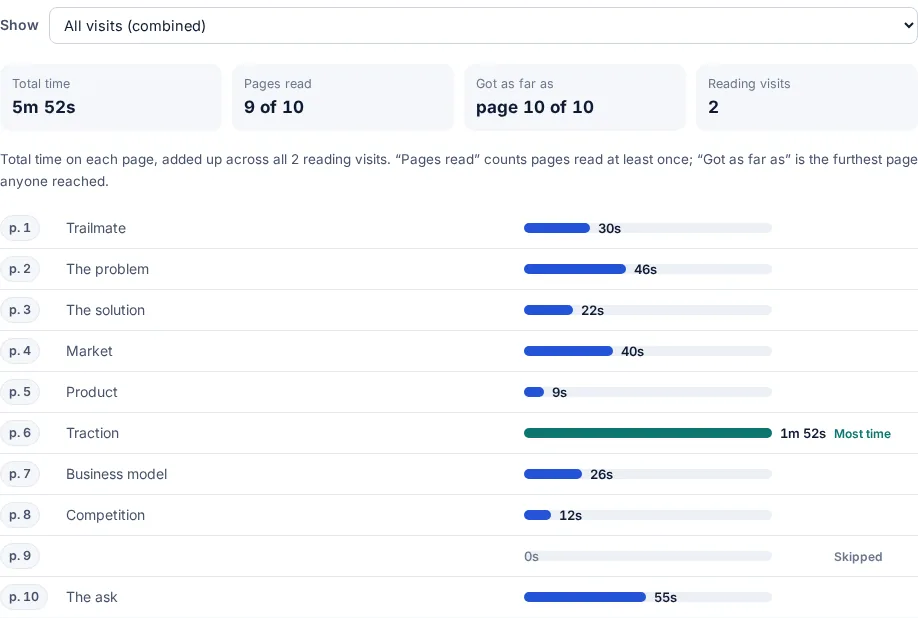
How founders track a pitch deck
Send the deck, read the signals, follow up
The same deck, a different link for each investor.
-
Step 1
Upload the deck
PDF or PowerPoint. The deck opens in the browser on any phone or laptop, with no download (Free).
-
Step 2
One link per investor
Add personal links from your mail merge, or on Pro paste your list and get one link per person.
-
Step 3
Read the slide-by-slide time
FileSeen shows time on each slide for each investor, and which visits went past the ask.
-
Step 4
Share the data room next
For investors who are interested, send a data room link with the financials and the model.
What founders use during a raise
The tools that decide who gets your next email.
- Time on each slide: who read the market slide three times, who stopped at slide two.
- One link per person (Pro): every open named, with no email to type.
- Email check and only listed people: a passed-on deck asks for a confirmed email; limit it to @fund.com.
- Expiry and replace a file, same link: old numbers stop circulating; update traction mid-raise.
- Email watermark: the reader's email and the date on every page.
More help: the pitch deck examples guide and the email pitch examples.
FileSeen, a PDF attachment or DocSend
| FileSeen | PDF attachment | DocSend | |
|---|---|---|---|
| Price | Free plan with every feature on 3 links; Pro $12 a month or $99 a year | Free | No free plan. Personal $15 and Standard $65 per user a month billed monthly; less billed yearly |
| Know when it is opened | Yes, with an email on every open (Free) | No | Yes |
| Time on each page or slide | Free | No | All plans |
| Confirm the reader's email before it opens | Free | No | Advanced and above |
| Reader's email as a watermark | Free, on PDFs | No | Advanced and above |
| Many files behind one link | Free: up to 400 files, no folders | No | Standard and above; data rooms on Advanced and above |
When FileSeen fits, and when it does not
A good fit
- Pre-seed to Series A founders sending one deck to many investors.
- Investors opening the deck in one tap, with no account.
- A small team sharing one deck, its updates and a short data room.
Not the right tool
- A large diligence with folders, Q&A and signed NDAs: use a full virtual data room.
- Detecting forwarding: FileSeen names readers, not forwards.
- Video decks or files over 95 MB.
FAQ
Pitch deck tracking questions
How can I see which investors opened my pitch deck?
Send the deck as a FileSeen link, with the email check or a personal link per investor, and the stats page lists each open with the investor's name, the date and the reading time.
Can I see how long an investor spent on each slide?
Yes. The stats page shows the time on each slide, visit by visit, on the free plan too.
Do investors need an account to open the deck?
No. The link opens in any browser on a phone, tablet or computer, with nothing to install.
Can I stop a deck from being downloaded or shared further?
PDF decks open view-only by default. You can require a confirmed email, limit the link to listed people or a fund's domain, and add an email watermark. Nobody can stop a screenshot.
Is pitch deck tracking free?
Yes. The free plan has every feature on 3 links, including time per slide and named readers. Deleting a link does not free a slot. Pro, $12 a month or $99 a year, is for unlimited links.
How does FileSeen compare to DocSend for founders?
On 18 October 2026 DocSend listed Personal at $10 and Standard at $45 per user a month billed yearly, with no free plan. FileSeen Pro is $12 a month or $99 a year and the free plan has every feature on 3 links. DocSend has richer data rooms and e-signatures. See the DocSend alternative page.
Who uses FileSeen