Compare
A DocSend alternative for sending one file and seeing who reads it
FileSeen and DocSend both turn a document into a tracked link. DocSend is a broad deal platform with data rooms and e-signatures; FileSeen does the sharing and tracking part, with a free plan and a lower price for one person. Here is the honest comparison, with prices checked on 18 October 2026.
Prices
| Plan | Billed yearly | Billed monthly | People included |
|---|---|---|---|
| FileSeen Free | $0 | $0 | 1 |
| FileSeen Pro | $99 a year (about $8.25 a month) | $12 a month | 1 |
| DocSend Personal | $10 per user a month | $15 per user a month | 1 |
| DocSend Standard | $45 per user a month | $65 per user a month | 1 |
| DocSend Advanced | $150 a month | $250 a month | 3 |
| DocSend Advanced Data Rooms | $180 a month | $300 a month | 3 |
DocSend has no free plan; it offers a 14-day free trial of Advanced Data Rooms. FileSeen has a free plan with every feature on 3 links and no time limit. On monthly billing FileSeen Pro costs less than DocSend Personal; on yearly billing the two are close, at about $8.25 against $10 a month.
Feature by feature
| Feature | FileSeen | DocSend |
|---|---|---|
| Free plan | Yes: every feature on 3 links | No; a 14-day trial |
| Making a link | Upload, confirm your email with a 6-digit code, copy the link. No account form | Create an account first, then upload |
| Password, expiry, view-only, delete | Free | All plans |
| Opens and reading time | Free | All plans |
| Time on each page or slide, visit by visit | Free | All plans (document level analytics) |
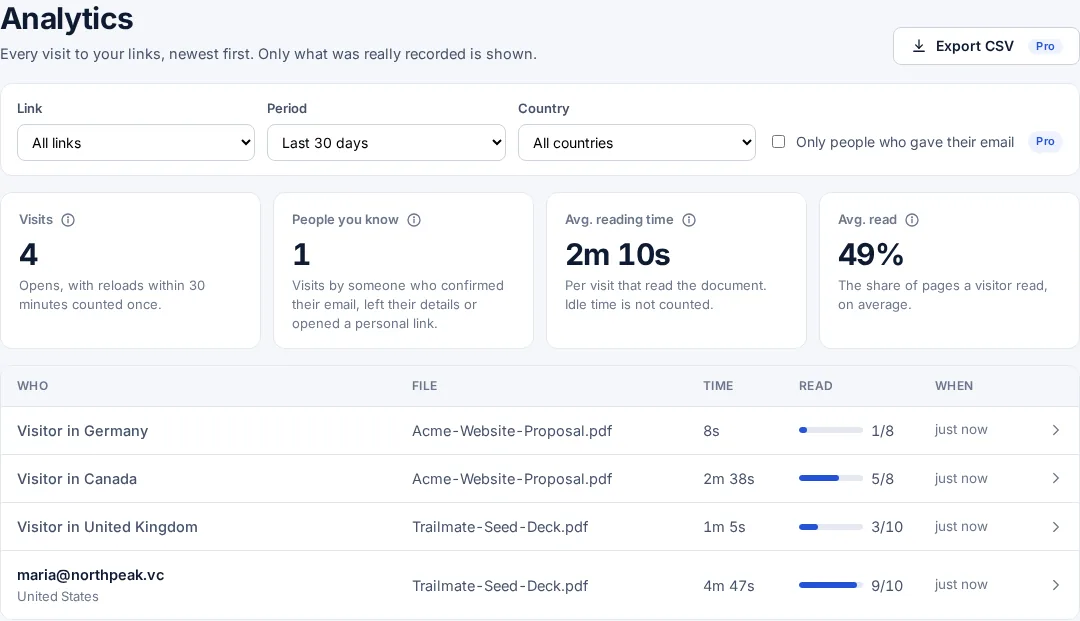
| A report of every visit: when, where from, and who, once they gave their email | Free | All plans |
| Ask for and confirm the reader's email (one-time code) | Free | Advanced and above |
| Watermark with the reader's email and the date on every page | Free, on PDFs | Advanced and above |
| Your logo and colours | Free | Standard and above |
| One link per person from a list | Pro (you send them with your own mail merge) | Mail merge support (see their page for which plans) |
| Several files behind one link | Free: up to 400, as a list, thumbnails or slideshow | Standard and above |
| Data rooms | Many files in one link with one password, email check, expiry, an allow list of emails or company domains, and reading time per file. No folders or per-file permissions | Advanced and above |
| E-signatures | No | 4 a month on Personal, unlimited above |
| Integrations (Gmail, Outlook, Salesforce and others) | No | Yes |
| Largest file | 95 MB | 2 GB |
| Video | Not supported | Video analytics on Standard and above |
| NDAs before opening | A consent box the reader must tick, in your words (Free). No signed NDA document | Advanced and above |
When DocSend is the better choice
- You are running a fundraise or an acquisition and need a data room with folders, permissions and an audit log.
- You want documents signed in the same place they are shared.
- Your team works in Salesforce or wants sharing inside Gmail and Outlook.
- You send large files or video.
When FileSeen is the better choice
- You send a proposal, deck or report and want to know whether and how it was read, without setting up a platform.
- You want to start free, with no trial clock, and pay only when you need who opened it and time per page.
- You want one link per recipient from a list, and to send it from your own email.
- You want the person reading to open it in any browser, with no account.
- You want links on your own address, such as docs.yourcompany.com (Pro, one DNS record, active in a few minutes).
Moving a document over
There is nothing to migrate: upload the same PDF or deck to FileSeen and send the new link. Links you already sent elsewhere keep working there until you turn them off. If you want to keep stats in one place, start new conversations with FileSeen links and let older ones run their course.
FAQ
DocSend alternative questions
Is there a free DocSend alternative?
Yes. FileSeen has a free plan with every feature on 3 links and no time limit: who opened it, time on each page, the email check and the watermark. Deleting a link does not free a slot. DocSend offers a 14-day trial rather than a free plan.
Is FileSeen cheaper than DocSend?
For one person, yes on monthly billing ($12 against $15 a month for DocSend Personal) and slightly on yearly billing ($99 a year, about $8.25 a month, against $10 a month). DocSend's higher plans include data rooms and e-signatures, which FileSeen does not offer.
How much does DocSend cost?
On 18 October 2026 DocSend listed Personal at $10 per user a month billed yearly ($15 monthly), Standard at $45 ($65 monthly), Advanced at $150 a month for three users ($250 monthly) and Advanced Data Rooms at $180 a month ($300 monthly). Check docsend.com/pricing for current prices.
Does FileSeen have data rooms or e-signatures?
A simple data room, yes: one link can hold up to 400 files, shown as a list, thumbnails or a slideshow, with one password, email check and expiry for the whole set, and PDFs carry the reader's email watermark. Opens and reading time are shown for each file, an allow list can limit who gets in, and there are no folders or per-file permissions. There are no e-signatures. For a full deal room with folders, audit logs and signatures, DocSend or a dedicated tool is the better fit.
More from FileSeen