HEIC to JPG
HEIC to JPG: convert iPhone photos in your browser
Add your .heic photos, pick a quality, and download JPGs that open on Windows, in school and work portals, and in every app. Nothing is uploaded.
How to convert HEIC to JPG
From iPhone photo to JPG in three steps
Works for one photo or a whole album.
-
Step 1
Add the HEIC photos
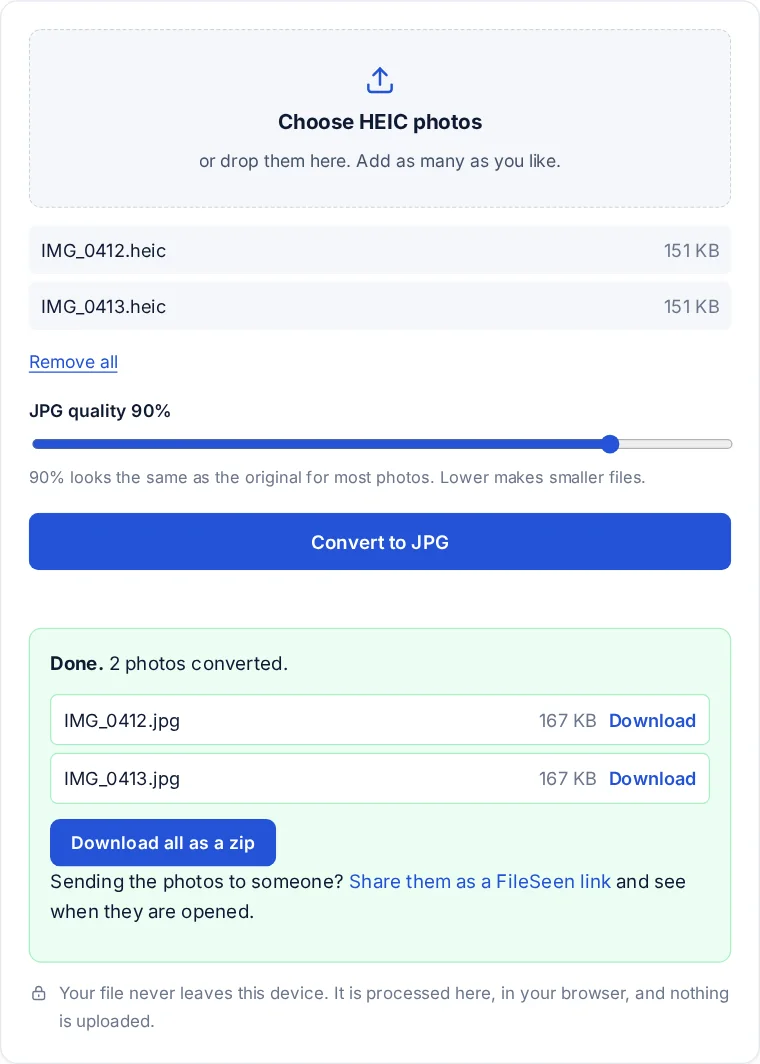
Pick them or drop them on the box. They are read by this page, not sent anywhere.
-
Step 2
Pick a quality
90% is a good default. Go lower only if the JPGs must be small.
-
Step 3
Download the JPGs
One at a time, or every photo in a single zip.
Why your photos are HEIC in the first place
Since iOS 11, iPhones save photos as HEIC by default. HEIC is a High Efficiency Image File, a format built on the same compression as HEVC video, and it stores a photo in roughly half the space of a JPG of similar quality. The catch is support: Windows needs an extension to show it, many websites and school or work portals only accept JPG or PNG, and older software does not recognise the file at all.
JPG is the opposite: larger files, but readable by everything. The Library of Congress format notes on JPEG cover its history and how widely it is supported. Converting is the quickest way to make a photo acceptable to a site that refused it.
What changes in the JPG
- The picture: the same width and height as the original, saved at the quality you pick.
- File size: usually larger than the HEIC, because JPG compresses less efficiently. Lower the quality setting if the JPGs must be small.
- Hidden details: the photo is decoded and saved again, so the camera details stored in the HEIC, such as the location where it was taken, are not copied into the JPG. That is often a plus before posting a photo.
- Live Photos and bursts: the still image is converted. Motion and extra frames are not.
For school and work portals
A photo of a worksheet, an ID card or a receipt that a portal rejects is almost always a HEIC problem. Convert it here, then upload the JPG. If the portal wants one PDF instead of several images, skip a step and use photos to PDF, which reads HEIC directly.
Stop it happening again on the iPhone
Two settings in the iPhone help. Under Settings, Camera, Formats, choosing Most Compatible makes the camera save JPG from then on, at the cost of larger files. Under Settings, Photos, the option Transfer to Mac or PC set to Automatic converts photos to JPG when they are copied to a computer by cable.
FAQ
HEIC to JPG questions
How to convert HEIC pictures into JPG?
Add the photos at the top of this page, choose a quality and press Convert to JPG. Download each JPG, or all of them in one zip. The conversion runs on your device.
How to make a photo a JPEG on iPhone free?
For new photos, set Settings, Camera, Formats to Most Compatible. For photos you already took, open this page in Safari on the iPhone, add them from your photo library and convert them here.
How do I open a HEIC file on Windows 11?
Windows needs the HEIF Image Extensions from the Microsoft Store, and some versions also need a paid HEVC extension. Without installing anything, open the photo in the HEIC viewer or convert it to JPG here.
Can I just rename a HEIC to JPG?
No. Renaming changes the label, not the data inside, so most apps still cannot read it or call it damaged. The photo has to be converted, which this page does.
Is there a limit on how many photos I can convert?
No fixed limit. Very large batches depend on your browser's memory, so a few hundred at a time is a sensible maximum on a phone.
More from FileSeen