Resume QR code
Resume QR code: show the work behind the page
A one-page resume can only list your work. Add a QR code that opens your portfolio, case studies or writing samples, and get an email every time it is opened.
Swap the file anytime. The printed QR code keeps working.
Uploading. Keep this page open.
Where should the code go?
File uploaded. Enter your email to get your link.
Enter the code
Sent to . It expires in 10 minutes.
Your link is ready
Free: every feature on 3 links, including who opened it and time on each page.
Opening it from here does not count as an open.
See when it is seenYour private stats page. Keep it to yourself: anyone with it can see the stats.Both links are in your email too. Upgrade to Pro.
How to put a QR code on a resume
Portfolio link to printed resume in three steps
The code adds proof to a resume; it does not replace the resume.
-
Step 1
Upload the proof
A portfolio, case studies, writing samples or a longer academic CV. Not the same resume again.
-
Step 2
Add the code near your contact line
Top right or beside your email, about 2.5 cm (1 in) wide, with a label such as "Portfolio".
-
Step 3
Hear back when it is opened
Every open sends you an email, so you know the resume reached someone who looked further.
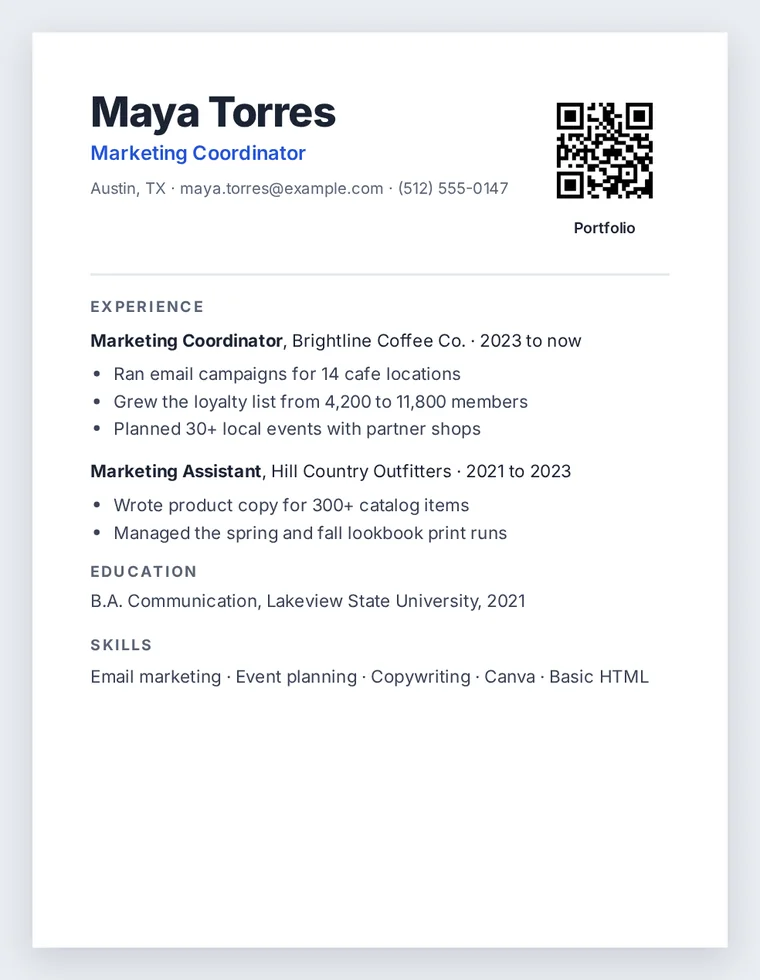
Where a resume QR code helps, and where it does not
A QR code is just a printed link: Denso Wave, which created the format, designed it to be read quickly by a camera. That is why it earns its place on paper: a resume handed over at a career fair, left after an interview, or printed for a panel. On an application uploaded online, the reader is already on a screen, so give the plain link as well; a code inside a PDF on a laptop is awkward to scan.
- Name the file well. The link address is made from the file name, so maya-torres-portfolio.pdf becomes maya-torres-portfolio.fileseen.page. That reads well if a recruiter types it.
- Keep it current. Replace the portfolio at the same link, so codes on resumes you already handed out open the new version.
- Set an end date. An expiry of 30 days suits a job search. After that the link shows that it has expired.
- Protect references. If the file lists referees, add a password and tell the recruiter what it is.
What you learn when it is opened
Every open sends you an email. The link's stats page then shows how many times the portfolio was opened, on which days, from which countries, and the total reading time. A second open a few days after an interview is usually a good sign.
You can also see the time spent on each page, which shows whether the case study you care about was read, and you can ask readers for their email before the file opens. Both are on the free plan.
FAQ
Resume QR code questions
How can I make a QR code for my resume?
Upload your portfolio or work samples at the top of this page, confirm your email with the 6-digit code, and save the QR code image. Insert it into your resume file next to your contact details.
What is a scannable resume?
The phrase means two things. Usually it is a resume laid out so applicant tracking software can read it: plain headings, no text inside images. It can also mean a printed resume with a QR code, which is what this page makes. The two work together: keep the layout simple and put the code beside the contact line.
What is the 7 second rule in resume?
It refers to an often-quoted recruiter eye-tracking finding that a first look at a resume lasts only a few seconds. Whatever the exact number, it argues for a short, clear page, with the deeper work behind a link or code.
Can ChatGPT generate QR codes?
It can explain how and write code that draws one, but the QR code you print should point to a link that stays online and that you control. A FileSeen code opens your hosted file and counts the opens.
Will recruiters really scan it?
Some will and some will not, which is why the open email is useful: you find out instead of guessing. Always include the written link as well.
More QR codes