Guide
Companies House identity verification: send your ID to your accountant safely
Your accountant needs your ID for the Companies House check. Send it as a locked link that expires, not an email attachment.
Uploading. Keep this page open.
Where should the code go?
File uploaded. Enter your email to get your link.
Enter the code
Sent to . It expires in 10 minutes.
Your link is ready
Free: every feature on 3 links, including who opened it and time on each page.
Opening it from here does not count as an open.
See when it is seenYour private stats page. Keep it to yourself: anyone with it can see the stats.Both links are in your email too. Upgrade to Pro.
Safer than an attachment
Send your ID in three steps
About two minutes.
-
Step 1
Make one PDF
Photograph the ID pages and combine them with Photos to PDF.
-
Step 2
Lock the link
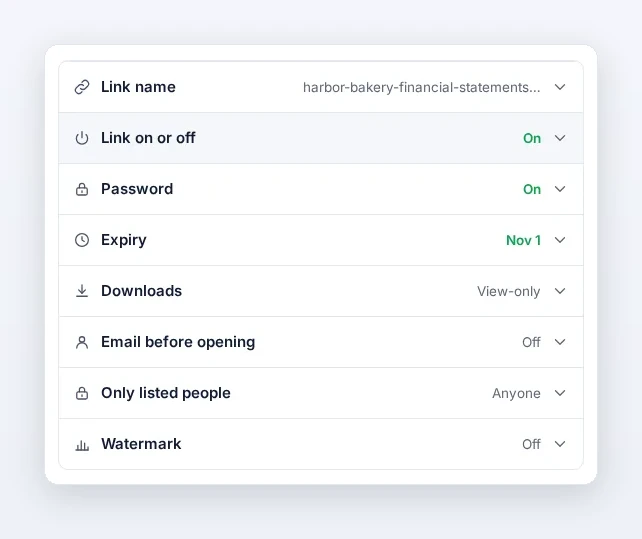
Upload it above. Turn on a password, an end date a few days away and view-only.
-
Step 3
Send it
Send the link, give the password by phone or text, and get an email when it is opened.
The settings to turn on
Password, expiry and view-only. Your accountant can read the pages but not download them.
The rule in short
| Since | 18 November 2025, with a 12-month transition |
| Directors | Give their personal code with the company’s next confirmation statement |
| Two ways | Yourself with GOV.UK One Login, or through an ACSP, “for example, an accountant or solicitor” |
| Never | Post or email ID documents to Companies House |
Sources: Identity verification, Verifying your identity, When you need to verify (GOV.UK), checked 30 Oct 2026.
After the check
Switch the link off
Once your accountant confirms, the passport is no longer reachable.
Keep your code private
Share your personal code only with people you trust.
Or do it yourself
GOV.UK One Login verifies you directly, free.
FAQ
Companies House ID questions
Do I have to send my passport to my accountant?
Only if they verify you as an ACSP. You can also verify yourself, free, with GOV.UK One Login.
Is it safe to email a passport scan?
An attachment stays in both mailboxes and every backup. A locked link can be switched off when the check is done.
Can I email my passport to Companies House?
No. GOV.UK says not to post or email identity documents to Companies House.
Does my accountant need an account to open it?
No. It opens in any browser after the password. To lock the file itself too, use Password-protect PDF.