PACER PDF checker
PACER PDF checker: test a PDF before you e-file it
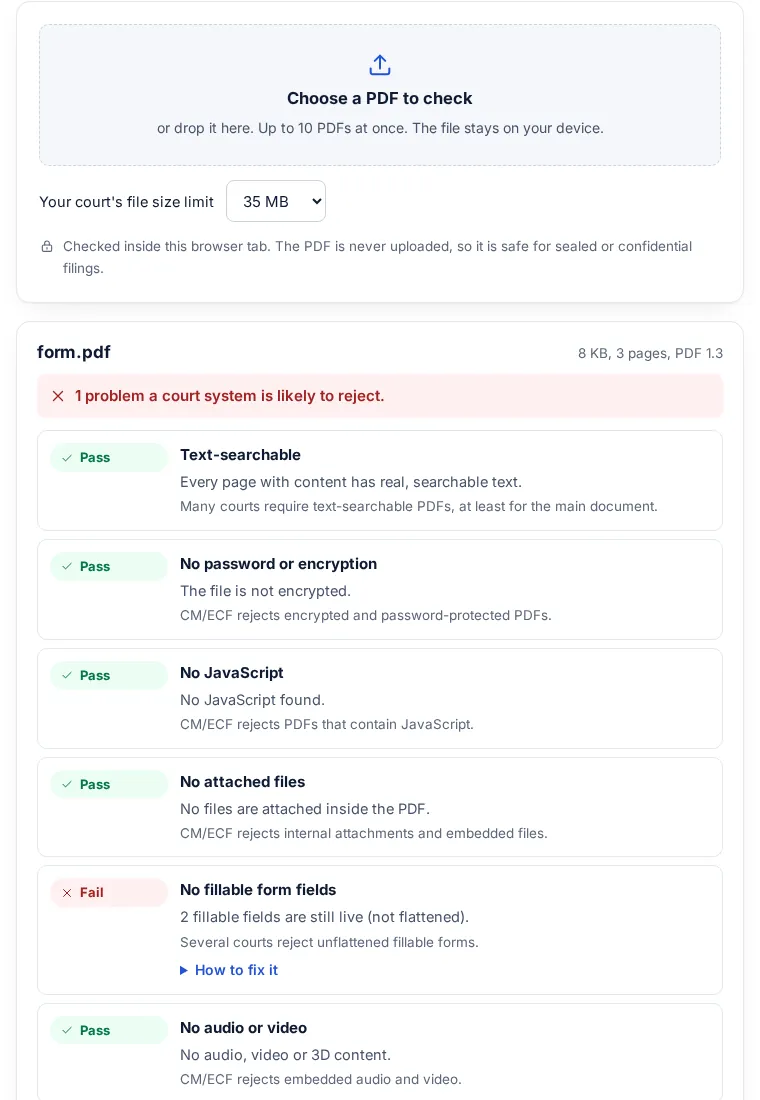
This PACER PDF checker tests a file against what federal CM/ECF e-filing rejects. Court e-filing systems reject PDFs that are encrypted, too large, or contain scripts, attachments or live form fields, and many courts require text-searchable pages. Find out before you file. The PDF is checked in your browser and never uploaded.
Rules differ by court. These checks cover what CM/ECF systems commonly reject. Your court's local rules and its own PDF check (in CM/ECF under Utilities) have the final word. This is not legal advice.
How it works
Check a filing in three steps
Nothing to install, and nothing leaves your computer.
-
Step 1
Choose the PDF
Pick your court's size limit, then pick or drop up to 10 PDFs.
-
Step 2
Read the results
Pass, fail or check for each rule, with the page numbers that need work.
-
Step 3
Fix what failed
Each problem has the steps for Acrobat, Word or a free option. Then check the new file again.
PACER and CM/ECF PDF requirements: the nine checks
Each one matches a reason a court's e-filing system gives for rejecting a PDF. A failed check comes with the steps to fix it in Word, Acrobat or a free option.
| Check | What it looks at | Court rule |
|---|---|---|
| Text-searchable | Every page has real text. Pages that are only a picture (a scan) are listed by number. | Oregon district court requires it for all filings; Nevada bankruptcy court for main documents. |
| No password or encryption | The file has no security settings, including the kind that opens without a password. | Rejected by CM/ECF (Oregon, Nevada bankruptcy, Maryland bankruptcy). |
| No JavaScript | No scripts that run when the file opens or when a field is used. | Rejected by CM/ECF (Oregon, Nevada bankruptcy, Maryland bankruptcy). |
| No attached files | No files embedded inside the PDF. | Internal attachments are rejected (Oregon, Nevada bankruptcy, Maryland bankruptcy). |
| No fillable form fields | Forms are flattened, so answers are part of the page. | Oregon prohibits unflattened forms; Nevada bankruptcy rejects editable forms. Maryland bankruptcy accepts them. |
| No audio or video | No sound, movie or 3D content. | Rejected by CM/ECF (Oregon, Nevada bankruptcy, Maryland bankruptcy). |
| File size | The file is under the limit you choose above the file picker. | 35 MB in Nevada bankruptcy and the Central District of California, 50 MB in Maryland bankruptcy, 75 MB in Oregon, 100 MB in the Western District of Washington. |
| Letter size pages | Every page is 8.5 x 11 inches. Other sizes are listed for you to check. | Federal appeals rule 32 sets 8.5 by 11 inch paper for briefs. |
| Links to websites | Counts links that open a website. | Nevada bankruptcy rejects them; Maryland bankruptcy accepts them. |
Rules differ by court
There is no single national limit. Five courts, as their own pages state them (checked 26 October 2026):
| Court | Size limit | Other rules | Source |
|---|---|---|---|
| U.S. District Court, District of Oregon | 75 MB | Rejects JavaScript, encryption, password protection, internal attachments, audio and video. Requires text-searchable PDFs (LR 5-2(b)) and prohibits unflattened fillable forms. | Creating and filing documents |
| U.S. Bankruptcy Court, District of Nevada | 35 MB | Rejects JavaScript, encryption, attachments, audio and video, editable forms and links to external websites. Main documents must be text-searchable (its OCR page, linked below). | NextGen CM/ECF PDF requirements |
| U.S. Bankruptcy Court, District of Maryland | 50 MB | Rejects JavaScript, audio and video, encryption and embedded files. Accepts editable forms and links. | PDF requirements guide (PDF) |
| U.S. District Court, Central District of California | 35 MB | Larger files must be split into sub-volumes (notice of 2 August 2019). | PDF file size limit increase |
| U.S. District Court, Western District of Washington | 100 MB | Raised from 75 MB per document (notice of 6 March 2026). | Maximum allowable PDF file size raised |
The Nevada bankruptcy court also explains how to make a PDF text-searchable with OCR, and the Oregon court notes that printing a file to PDF often solves a rejection. Page size: Federal Rule of Appellate Procedure 32 sets 8.5 by 11 inch paper for briefs.
Always check your own court's local rules. This page is a quick technical check, not legal advice.
Why the PDF is never uploaded
Court filings often hold information that must not leave your office before it is filed, or at all: sealed exhibits, medical records, financial account details. This checker reads the file inside the browser, using the same PDF engine that Firefox uses, so no part of it reaches a server. It does not run any script inside the PDF; it only reports that one is there. You can switch off your internet connection after the page loads and it still works.
What this checker does not do
- It does not know your court's local rules, such as margins, font size, page limits, redaction of personal identifiers or how exhibits must be split. Check those yourself.
- It does not run the full PDF standards check that CM/ECF runs. A file can pass here and still be rejected, for example when it was made on a Mac with Word's Best for printing option, which the Oregon and Nevada bankruptcy courts list as rejected.
- It does not change the file. To fix a problem, use the steps under each result.
- A page counts as text-searchable when it has at least 20 characters of real text. A page with a short caption over a scanned picture may show as a picture-only page.
FAQ
Court PDF questions
What does CM/ECF stand for?
Case Management/Electronic Case Files, the federal courts' system for filing case documents online. Filing a document in CM/ECF needs a PACER account and filing access from the individual court, and one sign-on reaches both PACER, where case files are read, and e-filing, according to uscourts.gov.
What is a text-searchable PDF?
A PDF whose pages hold real text, so words can be selected and searched. A scan is only a picture of text until OCR adds a text layer. Find scanned pages and add the text with the make PDF searchable tool.
Why was my PDF rejected by CM/ECF?
The common reasons are: it is encrypted or password-protected, it contains JavaScript, attached files, audio or video, it has fillable form fields that are not flattened, it is over the court's size limit, or it is not text-searchable where the court requires it. This checker tests for each of these.
How do I make a PDF text-searchable for court?
Export the PDF straight from your word processor instead of scanning a printout. For scanned pages, run OCR (text recognition). In Acrobat: Tools, Scan and OCR, Recognize Text.
How do I flatten a PDF form for e-filing?
Fill in the form, then print it to a new PDF: Microsoft Print to PDF on Windows or Save as PDF on a Mac. The new file has the answers on the page and no live fields.
What is the CM/ECF file size limit?
Each court sets its own. On their own pages: 35 MB at the Nevada bankruptcy court and the Central District of California, 50 MB at the Maryland bankruptcy court, 75 MB in the District of Oregon, 100 MB in the Western District of Washington. Choose your court's limit above the file picker.
Is my PDF uploaded?
No. The PDF is opened and checked inside your browser tab. No part of the file is sent anywhere.
Is this legal advice?
No. It is a technical check of the PDF. Your court's local rules and clerk's office have the final word.
Is it free?
Yes. No sign-up, no limit on files, no watermark.
Next: send it as a link
Sending the filed copy to a client or co-counsel? Send one link instead of a large attachment. It opens in any browser, and you can add a password or an expiry date.
Related tools