winmail.dat viewer
Open a winmail.dat file
Got a winmail.dat instead of the attachments? Drop it here to get the files out. It stays in your browser.
How it works
How to open winmail.dat
On a Mac, an iPhone, Android or Windows, with nothing to install.
-
Step 1
Choose winmail.dat
Save it from the email, then pick it or drop it on the box.
-
Step 2
See what is inside
The attachments, the message and any attached emails.
-
Step 3
Download the files
One by one, or all of them in one zip.
What you get
Outlook's package, unpacked in your browser.
- AttachmentsEach file with its real name and size, and a Download button.
- The messageHTML or plain text. Rich text is shown without its formatting.
- Attached emailsShown below the message, with their own files.
- PicturesPictures inside the message. Pictures on the web are not loaded.
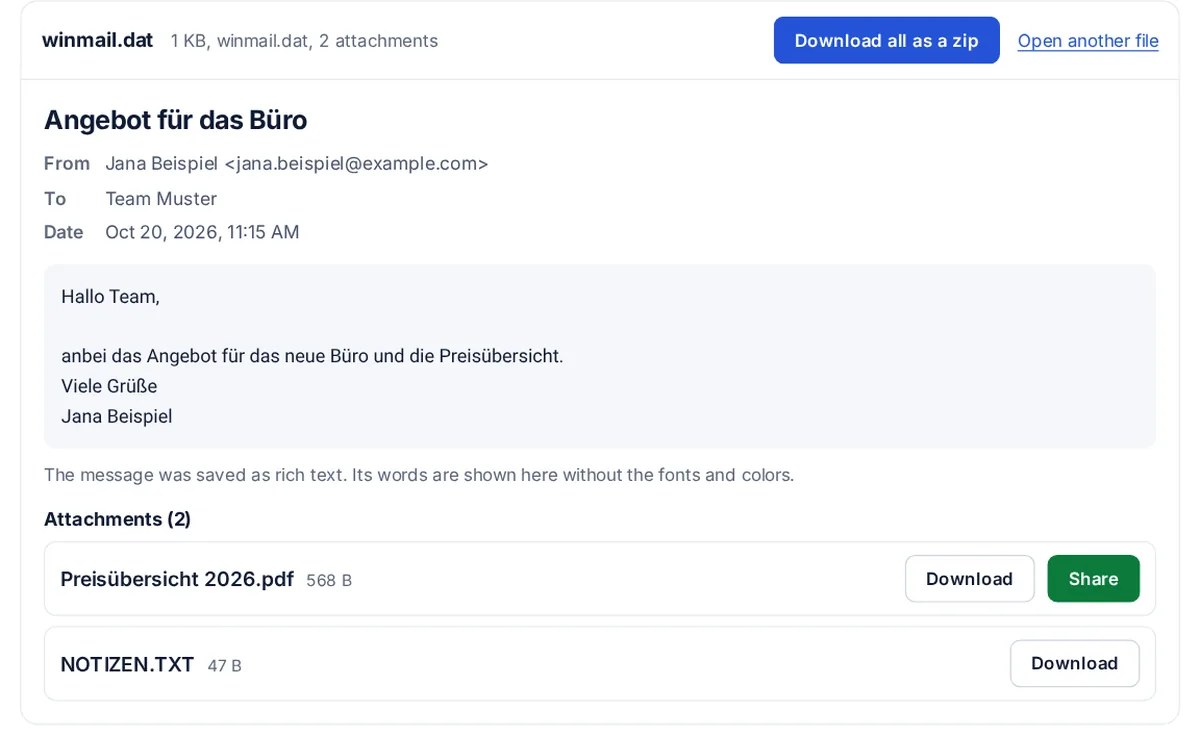
What is winmail.dat?
Outlook packs a Rich Text email and its attachments into one file called winmail.dat, in Microsoft's TNEF format. Apple Mail and many phone apps often show only that file.
How the sender can stop it
In Outlook on Windows: File, Options, Mail, then set "Compose messages in this format" to HTML. Most new emails then arrive with normal attachments.
FAQ
winmail.dat viewer questions
What is a winmail.dat file?
A package Outlook makes when it sends an email in Rich Text format. It holds the attachments and the formatting, so mail apps other than Outlook cannot open them.
How do I open winmail.dat on a Mac or iPhone?
Save the file from the email, then open this page in Safari and choose it. The attachments are listed with Download buttons.
Is the file uploaded?
No. It is unpacked inside your browser tab and nothing is sent. Only a Share button sends a file, and only when you click it.
Why is the message text missing?
Often the text is in the email itself, and winmail.dat holds only the attachments and the formatting. The page says so when there is no text inside.
Can I download all the attachments at once?
Yes. With two or more files, the Download all as a zip button puts them in one zip, made in your browser.
Related tools