Metadata remover
Remove metadata from PDF, Word and photos
Remove metadata in one click: see the author name, company, comment names and photo location hidden inside a file, then download a clean copy. Made for anonymous marking, blind peer review and sharing photos safely. Nothing is uploaded.
How it works
Clean a file in three steps
Nothing to install. The files never leave your computer.
-
Step 1
Choose the files
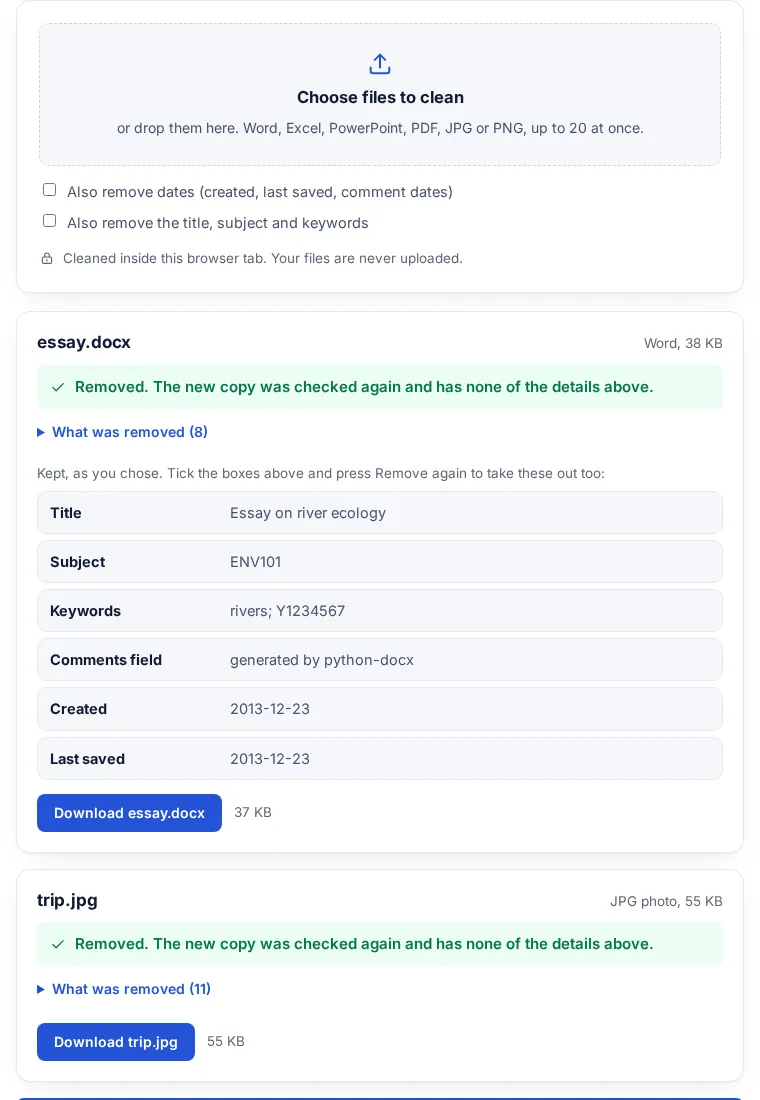
Pick or drop Word, Excel, PowerPoint, PDF, JPG or PNG files, up to 20 at once.
-
Step 2
See what is hidden
Each file shows what was found: author, last modified by, comment authors, company, GPS location and more.
-
Step 3
Remove and download
The tool removes it, checks the new copy again, and gives you a clean file to download.
What it removes, file by file
Dates, the title, the subject and keywords stay unless you tick the boxes above the file picker. Names typed into the document itself are never touched.
| File | What is removed | What stays |
|---|---|---|
| Word (DOCX) | Author, last modified by, company, manager, custom properties, the template folder path, comment authors and tracked change authors (renamed Author), GPS and camera details in pasted photos. | The text, comments and tracked changes themselves. |
| Excel (XLSX) | Author, last modified by, company, manager, custom properties, comment authors, the folder the file was saved in. | Every sheet, formula and comment. |
| PowerPoint (PPTX) | Author, last modified by, company, manager, custom properties, comment authors, photo details in pictures. | Every slide and comment. |
| Author, creator, producer, subject, keywords, extra fields such as company, the XMP metadata block, and the names on comments and highlights (renamed Author). | Every page, its text and its form fields. | |
| JPG | EXIF (GPS location, camera, serial number, date taken), XMP, IPTC and comments. | The picture data, byte for byte: no new compression. The rotation flag stays. |
| PNG | Text notes (author, comments), EXIF with GPS, and the last-changed time. | The picture data, byte for byte. |
How to anonymise a Word document for marking or blind review
When a file is marked anonymously, your name must not be anywhere in it, including the hidden properties. The University of York tells students that it is their own job to anonymise files before an anonymous submission: the file name, the contents, and the file metadata, such as 'author name' or 'last modified by'
. Its guide adds that the learning platform will not do this for you.
Office files keep more than the author field: each comment and each tracked change stores the name of the person who made it, and there are company and manager fields too. This tool shows all of them before it removes anything, so you can see what a marker or reviewer would have seen.
Photos are the other common leak. Apple's personal safety guide explains that the Camera app embeds the coordinates where a photo was taken, and that people you share the photo with may be able to see that location.
Sources: University of York, Anonymising your work; Apple Personal Safety User Guide, Manage location metadata in Photos. Always follow your own course or journal instructions as well.
Your files are never uploaded
The files are opened and cleaned by this browser tab. Nothing is sent to FileSeen or anyone else, so it is safe for unpublished papers, exam scripts and client documents. You can turn off your internet connection after the page has loaded and it still works.
For photos, the picture data is copied as it is, with no new compression, so the photo looks exactly the same.
What this tool does not do
- It does not remove your name if it is typed in the document itself, in a header or footer, or on a title slide. Read the file through once.
- It does not rename the file. If the file name has your name in it, rename it before you submit.
- It does not change pictures inside a PDF, and it cannot clean a password-protected PDF.
- It does not handle HEIC photos. Convert them to JPG first, then clean the JPG here.
- Comments and tracked changes stay in the file, only their author names change. Accept or delete them in Word if the marker should not see them.
- A cleaned PDF loses its XMP block, so a PDF/A file no longer says it is PDF/A.
FAQ
Metadata questions
How do I remove metadata from a PDF?
Choose the PDF at the top of this page and press Remove and download. The author, creator, producer, subject, keywords, the XMP block and the names on comments are removed, and old saved versions inside the file are dropped. The pages are not changed.
How do I remove the author name from a Word document?
Choose the DOCX file at the top of this page, check what was found, and press Remove and download. In Word itself: File, Info, Check for Issues, Inspect Document, then Remove All next to Document Properties and Personal Information.
Does it remove last modified by?
Yes. In Word, Excel and PowerPoint files the author and last modified by fields are both removed, along with company and manager.
What happens to comments and tracked changes?
They stay in the file, but every comment author and every tracked change author is renamed Author, so nobody can tell who wrote them.
Can it remove GPS location from photos?
Yes. For JPG and PNG files the EXIF data is removed, including GPS location, camera model, serial number and date taken; a JPG keeps only its rotation flag so it stays upright. The picture itself is not compressed again. More on photos: remove EXIF data from photos.
How do I anonymise comments in Word?
Clean the DOCX here: every comment author and every tracked change author is renamed Author, and the dates can go too. The comments themselves stay, so delete them in Word if the reader should not see them.
Are my files uploaded?
No. Everything happens inside your browser tab. No part of any file is sent anywhere.
Can I clean several files at once?
Yes, up to 20. Download each clean copy, or all of them in one zip.
Is it free?
Yes. No sign-up, no limit and no watermark.
Next: send it as a link
Sending the cleaned file to a marker, a journal or a client? Send one link instead of an attachment. It opens in any browser, and you can add a password or an expiry date.
Related tools