PDF accessibility checker
Free PDF accessibility checker, online
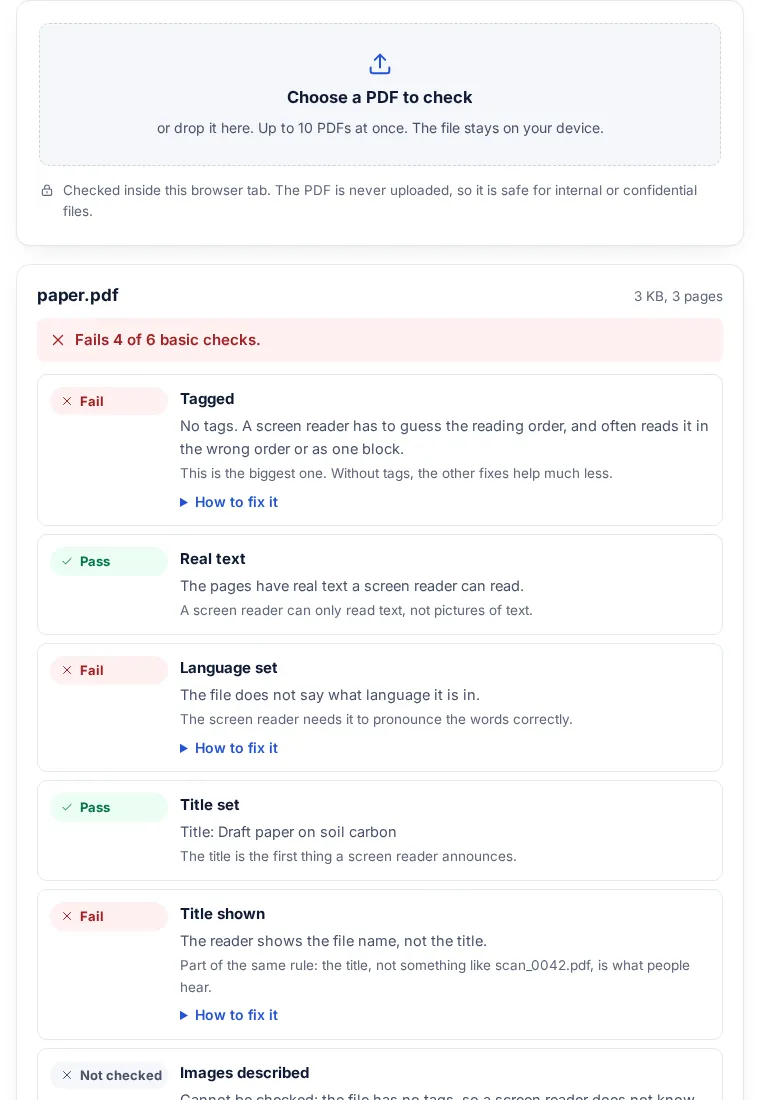
This PDF accessibility checker tells you in seconds if a screen reader can read your PDF: six basic checks for tags, text, language, title and alt text, each with a plain fix. It works on Windows, Mac and phones, and the file is checked in your browser, never uploaded.
These are the basics, not a full audit. Automatic checks cannot tell if the reading order makes sense or if the alt text is any good. For a full PDF/UA check, the free PAC checker (Windows) tests many more rules, and a person with a screen reader is the final test.
How common are these problems? In a study of 2,571 bank PDFs with these same six checks, only 24.5% passed all of them.
How it works
How to check if a PDF is accessible
Nothing to install, and nothing leaves your computer.
-
Step 1
Choose the PDF
Pick or drop up to 10 PDFs. They are opened inside this tab.
-
Step 2
Read the six results
Pass or fail for each check, with what it means for someone using a screen reader.
-
Step 3
Fix what failed
Each failed check has the steps for Word and Acrobat. Then check the new file again.
The six checks
Each one is a machine-checkable rule from WCAG 2.1 and PDF/UA, the standards that accessibility laws point to. A file that fails any of them is hard or impossible to use with a screen reader.
| Check | What it looks at | Why it matters |
|---|---|---|
| Tagged | A hidden structure map: headings, paragraphs, lists, tables and the reading order. | Without it, a screen reader guesses the order and often reads columns, headers and footers mixed together. |
| Real text | Text that can be selected, not a picture of text. | A scanned page is silent to a screen reader. |
| Language set | The file says which language it is written in. | The screen reader uses it to pick the right voice and pronunciation. |
| Title set | A real document title, not Untitled or a file name. | It is the first thing a screen reader announces. |
| Title shown | The file asks to show that title in the window, not the file name. | People hear Fee schedule 2026, not scan_0042.pdf. |
| Images described | Every tagged picture has alt text. | A picture without it is skipped or read out only as image. |
Why the file is never uploaded
Many PDFs that need checking are internal: a draft policy, a student form, a contract, a patient letter. University accessibility offices often advise against uploading sensitive documents to online checkers. This checker reads the file with the browser itself, using the same PDF engine that Firefox uses, so the content never reaches a server. You can switch off your internet connection after the page loads and it still works.
Is your PDF ADA compliant? Who needs accessible PDFs
- US state and local governments, public schools and universities: the Department of Justice rule under ADA Title II requires WCAG 2.1 AA for web content, including PDFs, from 26 April 2027 where the total population is 50,000 or more, and from 26 April 2028 for smaller ones and special districts.
- Businesses selling in the EU: the European Accessibility Act has applied since 28 June 2025 to services such as banking, e-commerce and transport, including the documents they publish.
- Anyone publishing for the public: a PDF that a screen reader cannot read shuts out blind and low-vision readers, and many people who use voice or magnifier software.
Passing the six checks here is a first step toward ADA and Section 508 conformance, not proof of it: WCAG 2.1 AA also covers reading order, colour contrast, tables and forms, which need a person or a full audit.
Source: ADA.gov, fact sheet on the web accessibility rule. This page is a quick check, not legal advice.
What this checker does not do
- It does not judge whether the reading order is logical, or whether the alt text describes the picture well. Only a person can.
- It does not test every PDF/UA rule, such as table headers, form field labels or colour contrast. For that, use the free PAC checker on Windows, or Acrobat Pro's full check.
- Text is sampled on the first 10 pages, and figures are counted on the first 300 pages.
Passing all six checks means the file has the foundation in place. Failing any of them means a screen reader user will have real trouble with it.
FAQ
PDF accessibility questions
How do I check if a PDF is accessible?
Choose the PDF at the top of this page. In a few seconds you see six checks, pass or fail: tags, real text, language, title, title shown, and alt text on pictures. Each failed check comes with the steps to fix it.
Is my PDF uploaded?
No. The PDF is opened and checked inside your browser tab. No part of the file is sent anywhere, so it is safe for confidential documents.
Is this a PDF ADA compliance checker?
It checks the basic, machine-testable part of what the ADA rule asks for (WCAG 2.1 AA): tags, real text, language, title and alt text. Passing it does not prove compliance, because reading order, contrast, tables and forms need a person or a full PDF/UA audit.
Is there a PDF accessibility checker for Mac?
Yes, this one. It runs in any modern browser, so it works on a Mac, on Linux and on a phone. The free PAC checker runs on Windows only.
What does title failed mean in a PDF accessibility check?
The PDF has no title in its document properties, or it has one but tells the reader to show the file name instead. This checker tests both: Title set and Title shown. Add a title under File, Info in Word before you export, or under File, Properties in Acrobat, and turn on Show Document Title in the Initial View tab.
What does primary language failed mean?
The PDF does not say what language it is written in, so a screen reader cannot choose the right voice. Set the language in Word under Review, Language before you export, or in Acrobat under File, Properties, Advanced, Language.
What makes a PDF accessible?
At minimum: tags that give it structure and a reading order, real text rather than scanned pictures, the document language, a title, and alt text on every meaningful image. Tables, forms and contrast matter too.
Is this the same as a PDF/UA check?
No. These six are the basic, machine-checkable part. PDF/UA has many more rules. A file that fails these six will fail PDF/UA too.
How do I make a PDF accessible in Word?
Use headings from the Styles menu, add alt text to pictures, set the language, and give the file a title under File, Info. Then use File, Save As, PDF, and under Options tick Document structure tags for accessibility.
Can I check a scanned PDF?
Yes. It will fail the real text check. Run text recognition (OCR) on it first, then tag it, or export a new PDF from the original document.
Is it free?
Yes. There is no sign-up, no limit on how many files you check, and no watermark.
Next: send it as a link
Once the PDF passes, send it to readers as a link instead of an attachment. It opens in any browser, on a phone too, and you can add a password or an expiry date.