EML to PDF
Convert EML to PDF, one email or thousands at once
Convert EML to PDF in your browser: saved emails become clean PDFs with the headers, the message, inline pictures and a list of attachments. Drop in one .eml file, a thousand, or a zip. Everything happens in your browser, so client email never leaves your computer.
How it works
How to convert EML to PDF
Nothing to install, and nothing leaves your computer.
-
Step 1
Choose the emails
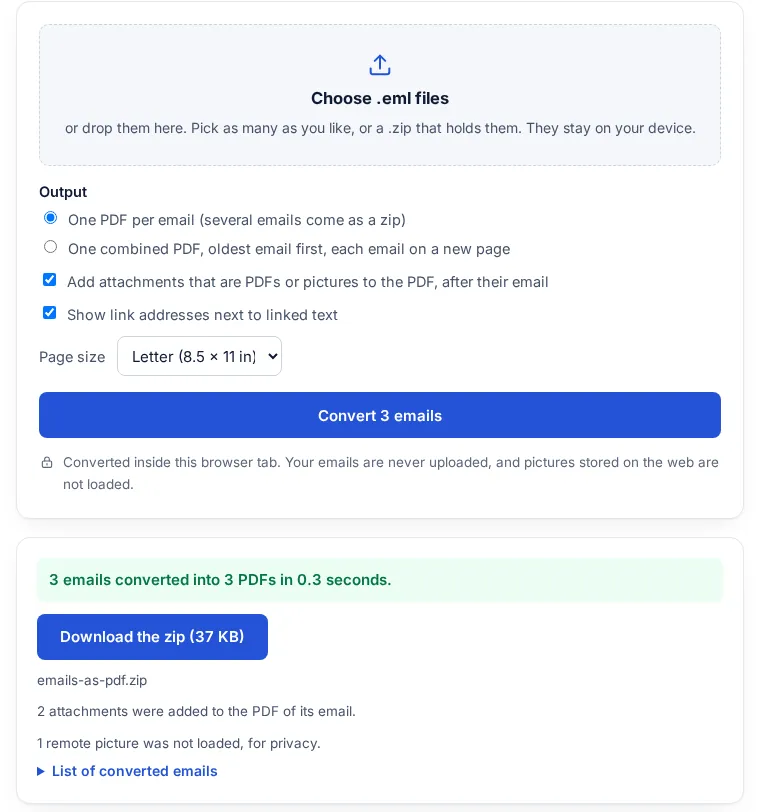
Pick .eml files or a .zip of them. Thousands at once is fine.
-
Step 2
Pick the output
One PDF per email, or one combined PDF in date order. Add PDF and picture attachments if you want them.
-
Step 3
Download
Big batches run one email at a time with a progress bar, and you can cancel at any point.
What goes into the PDF
Each email starts on a new page and has a page number footer, so a printed batch stays in order.
| Part of the email | What you get |
|---|---|
| Headers | From, To, Cc, Date and Subject at the top of each email, including names in any language (encoded headers are decoded). |
| Body | The HTML version when there is one, else the plain text. Headings, bold, lists, quotes and table rows are kept; colours and layout are not. |
| Text in any common encoding | UTF-8, ISO-8859-1, Windows-1252, ISO-2022-JP, Shift_JIS and more, quoted-printable or base64. Latin, Greek, Cyrillic, Japanese and Hindi text print with real fonts. |
| Pictures inside the email | Logos and photos that travel in the email itself (inline, cid:) are drawn where they belong. Pictures stored on a website are not loaded. |
| Forwarded emails | An email attached to an email is printed below it, with its own headers and body. |
| Attachments | Listed by name and size under each email. PDFs and pictures (JPG, PNG, GIF, WebP) can be added as pages right after the email. |
Why the emails are never uploaded
Email exports are often the most sensitive files in an office: client conversations, case evidence, medical or financial details. This converter reads each .eml file inside the browser tab and writes the PDF there too, with fonts and code served from this site. No part of an email is sent anywhere. You can switch off your internet connection after the page loads and it still works.
Pictures that an email only links to, stored on a web server, are never loaded. Converting an email makes no contact with any server, and the PDF notes how many pictures were left out.
What is an EML file, and how do you open one?
An .eml file is one email saved as plain text in the standard Internet Message Format (RFC 5322): the headers, the message and any attachments, all in one file. If no mail app on your computer opens it, convert it here and read the PDF in any browser.
How to get .eml files
- Gmail: open the email, click More, then Download message. Gmail saves it as an EML file (Gmail Help).
- Outlook on the web: open the email, choose More actions, then Save as or Download. The message is saved as an EML or MSG file, usually in your Downloads folder (Microsoft Support).
- Many at once: put the .eml files in a folder, zip it, and drop the zip here.
Limits
- The PDF keeps the words, links, basic formatting and pictures inside the email, not the exact colours and layout of a designed newsletter.
- Outlook .msg files are a different format and are not read. Save them as .eml first, or use Outlook on the web, which can save as EML.
- Arabic, Hebrew, Chinese-only characters, Korean, Thai and emoji have no font here and print as a question mark. Latin, Greek, Cyrillic, Japanese and Hindi (Devanagari) print correctly. Text copied out of the PDF in Hindi can put some vowel signs in the wrong order, as in many PDFs.
- Attachments other than PDFs and pictures (Word, Excel, zip files) are listed by name but not added. A password-protected PDF attachment is listed, not added.
- Up to 5,000 emails per run. Very large batches need a computer with enough memory, since the result is built in the tab.
FAQ
EML to PDF questions
What is an EML file?
One email saved as a file: the From, To, Date and Subject headers, the message and its attachments, in the standard Internet Message Format. Gmail's Download message and Outlook on the web's Save as both make one.
How do I open an EML file without Outlook?
Convert it to PDF here and open the PDF in any browser. You see the headers, the message, inline pictures and a list of attachments, and nothing is installed or uploaded.
How do I convert an EML file to PDF?
Choose the .eml file at the top of this page and press Convert to PDF. You get a PDF with the From, To, Cc, Date and Subject lines, the message and a list of attachments.
Can I convert many EML files to PDF at once?
Yes. Pick all the files, or drop a .zip that holds them. You get one PDF per email in a zip, or one combined PDF with the emails in date order. Batches of thousands run one email at a time, with a progress bar and a cancel button.
Are my emails uploaded?
No. Each email is read and turned into a PDF inside your browser tab. Nothing is sent to a server, and pictures stored on the web are not loaded.
Are attachments included?
Every attachment is listed by name and size under its email. With the option ticked, PDF and picture attachments are added as pages right after the email they came with.
How are the PDF files named?
By the email's date and subject, for example 2026-09-10_Deposition schedule.pdf, so they sort by date in any folder.
Does it work with Japanese or Hindi emails?
Yes. Subjects, names and message text in Japanese and Hindi print with real fonts, as do Latin, Greek and Cyrillic. Fonts load from this site only when an email needs them.
Can it open .msg files from Outlook?
No, .msg is a different format. Save the email as .eml first; Outlook on the web can save a message as EML.
Is it free?
Yes. No sign-up, no limit on how many batches you run, and no watermark.
Next: send it as a link
Sending the converted emails to a client or a colleague? A batch of PDFs is often too large to email. Send one link instead: it opens in any browser, and you can add a password or an expiry date.
Related tools