Exhibit PDF maker
Exhibit PDF maker: label, stamp and number court exhibits
This exhibit PDF maker turns photos, screenshots and PDFs into labeled exhibits. Put the files in order and download them as Exhibit A, B, C or 1, 2, 3, with a stamp on every page and optional slip sheets, Bates numbers and an index, in one combined PDF or one PDF per exhibit. Nothing is uploaded.
How it works
How to combine exhibits into one PDF
Nothing to install, and nothing leaves your computer.
-
Step 1
Add the files
Photos, screenshots, scans and PDFs, hundreds at once. iPhone HEIC photos work too.
-
Step 2
Put them in order
Drag, use the arrows, or sort by file name or date. Choose how files group into exhibits.
-
Step 3
Download
One combined PDF with an index and bookmarks, or one PDF per exhibit in a zip.
Exhibit stamps, slip sheets and Bates numbering
Every stamp, Bates number and index line is real text in the PDF, so it can be searched, selected and read by a screen reader.
| Option | What you get |
|---|---|
| Exhibit labels | Letters (A to Z, then AA, AB), numbers, or your own label per exhibit, with any word in front: Exhibit, Plaintiff's Exhibit, Tab. Start at any letter or number, for example Exhibit 14 when earlier exhibits are already filed. |
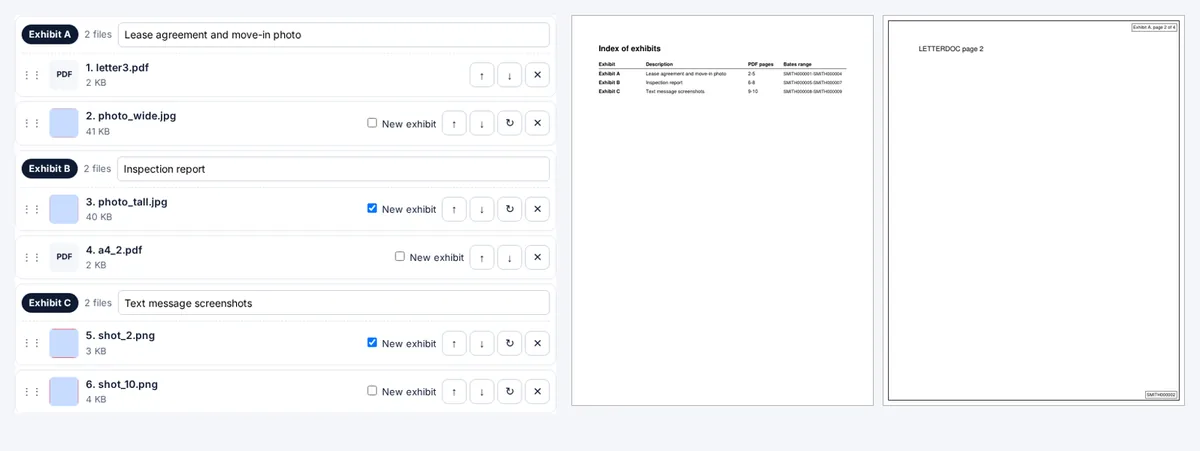
| Groups | Each file as its own exhibit, all files as one exhibit, or tick New exhibit on the file where each exhibit starts, so 40 photos can become Exhibit C. |
| Slip sheet | A page before each exhibit with its label in large type and an optional description. |
| Exhibit stamp | Exhibit A, or Exhibit A, page 2 of 5, in the corner you choose, on every page of the exhibit. |
| Bates numbers | Your prefix and a zero-padded number, such as SMITH000001, on every page, continuing across all exhibits. |
| Index | A first page listing each exhibit, its description, its PDF page range and its Bates range. |
| Bookmarks | The combined PDF opens with a bookmark for each exhibit, titled with its label and description. |
| Page size | US Letter or A4. Pictures are scaled to fit inside a half-inch margin, never stretched. PDF pages of other sizes can be fitted too. |
Rules differ by court
Courts do not agree on how exhibits are filed, so check your court's local rules before you choose one combined PDF or one PDF per exhibit. Four examples, from the courts' own pages (checked 26 October 2026):
- California state courts: rule 3.1110 of the California Rules of Court requires an index of exhibits that describes each exhibit and gives its number or letter and page number, consecutive page numbers, and, for electronic exhibits filed by a lawyer, bookmarks to the first page of each exhibit. Turn on the index; the combined PDF has the bookmarks.
- U.S. District Court, District of Maine: its e-filing FAQ says each exhibit must be filed as a separate attachment, even a one-page exhibit, and no attachment can exceed 20 MB. Choose one PDF per exhibit.
- U.S. District Court, District of New Hampshire: its note on attaching exhibits says each exhibit must be a separate attachment, individually numbered or lettered.
- U.S. Bankruptcy Court, Western District of Pennsylvania: Local Rule 5005-12 says each exhibit is filed as a separate PDF file with a description.
This tool formats the files. It is not legal advice, and your court's rules and clerk's office have the final word.
Why the files are never uploaded
Exhibits are often the most sensitive part of a case: medical records, bank statements, photos of injuries, private messages. This tool reads each file inside the browser tab and writes the PDF there too, with code served from this site. No part of a file is sent anywhere, and you can switch off your internet connection after the page loads.
200 photos or more
Files are added one at a time, with a progress bar and a Cancel button, so the page stays responsive with hundreds of photos. In a test with 280 files (220 photos of about 4 MB each and 60 phone screenshots), the exhibits were ready in 35 seconds with Smaller file on. Full-quality photos make a very large PDF, and the tab holds the whole result in memory: choose Smaller file to shrink each picture to 2,000 pixels on its long side, or make the exhibits in two batches, starting the second at the next label and Bates number. Then check the size against your court's limit with the court PDF checker.
Limits
- Password-protected PDFs cannot be added. Remove the password first.
- Fillable form fields in an added PDF keep their visible answers but stop being fillable. Flatten forms first if the answers matter.
- Stamps and Bates numbers sit on a small white box in the corner you choose. On a PDF page with text right at the edge, pick another corner.
- It does not OCR scans. A scanned PDF stays a picture of text; the scanned PDF checker can make it searchable.
FAQ
Exhibit PDF questions
How do I combine many photos into one PDF exhibit?
Add all the photos at the top of this page, sort them by name or date, choose All files are one exhibit, and press Make the exhibits. Every page gets the exhibit stamp, such as Exhibit A, page 12 of 50.
How do I label exhibits in a PDF?
Choose letters or numbers, the word in front (Exhibit, Plaintiff's Exhibit, Tab) and where to start. The label is stamped on each page as real text, and can also go on a slip sheet before the exhibit.
How do I add Bates numbers to a PDF?
Tick Bates numbers, type a prefix such as SMITH, choose the number of digits and the first number. Every page gets the next number, across all exhibits, for example SMITH000001 to SMITH000214.
What is an exhibit stamp?
A label on each page of an exhibit that names it, such as Exhibit A or Exhibit A, page 2 of 5, so a page that comes loose can be put back. Here it is added as real text in the corner you choose, on a small white box.
Can I make one PDF per exhibit?
Yes. Choose One PDF per exhibit and you get a zip with Exhibit A.pdf, Exhibit B.pdf and so on, plus Index of exhibits.pdf if the index is on. Bates numbers continue from one file to the next.
Can I mix photos and PDFs in one exhibit?
Yes. Choose I choose where each exhibit starts and tick New exhibit on the first file of each exhibit. Pictures go on their own page; PDF pages are added as they are, so their text stays searchable.
Are my files uploaded?
No. Everything happens inside your browser tab. No part of any file is sent to a server.
Is it free?
Yes. No sign-up, no limit on files and no watermark.
Next: send it as a link
Sending the exhibits to a client or opposing counsel? A large exhibit PDF can bounce as an email attachment. Send one link instead: it opens in any browser, and you can add a password or an expiry date.
Related tools