Blog
Acrobat Pro price: US$19.99 a month, and 10 PDF jobs that cost nothing
Adobe’s own plans page, checked on 24 October 2026, lists Acrobat Pro at US$19.99 a month on an annual plan, Standard at US$14.99 and Studio at US$24.99. Many everyday PDF jobs need none of them. FileSeen ran 10 of them through free browser tools and checked every output.
What Acrobat costs, from Adobe’s own page
Prices shown to a US visitor on Adobe’s plans page on 24 October 2026, for the “Annual, billed monthly” option.
| Plan | Price | What Adobe says it is |
|---|---|---|
| Acrobat Reader | Free | “Open and view PDFs with Acrobat Reader. Free. Always.” |
| Acrobat Standard | US$14.99/mo | “Essential PDF tools” |
| Acrobat Pro | US$19.99/mo | “Advanced PDF toolset”, including redaction, web forms and turning scans into editable PDFs |
| Acrobat Studio | US$24.99/mo | “Includes everything in Acrobat Pro, plus AI Assistant.” |
| Acrobat Express | US$9.99/mo | Listed on Adobe’s AI Assistant page: AI summaries, PDF Spaces and content creation |
Each paid plan carries the same line on Adobe’s page: “Fee applies up to half your remaining annual commitment if you cancel after 14 days.” Sources: Adobe Acrobat plans and pricing and Acrobat AI Assistant, both checked 24 October 2026.
Left out: claims Adobe’s pages do not show
Some reports mention a 15% first-year discount on Acrobat Studio for existing Standard and Pro customers, ending 31 October 2026, and separate AI Assistant prices. Neither appeared on Adobe’s plans page or AI Assistant page on 24 October 2026, so neither is used here.
10 PDF jobs, tested on free tools
Each job was run on FileSeen’s free tools in a Chromium browser on 24 October 2026, and every output was opened and checked with separate software.
Lock a PDF with a password
A PDF reader refused to open the result without the password. With it, the file opened: AES encryption, all 3 pages.
Put your own watermark on every page
“COPY FOR MARIA KELLER” appeared on all 3 pages, and the original text was still selectable.
Mark a file as DRAFT
One click on the DRAFT preset filled in the text; DRAFT was stamped on every page.
Black out emails, phone numbers and IBANs
The tool found the email address, phone number and IBAN on each page. After redaction none of them was left in the text layer.
Black out names and case numbers you type
“Maria Keller” and “CASE-55821”, typed into the word box, were found on every page and removed.
Redact a scanned page
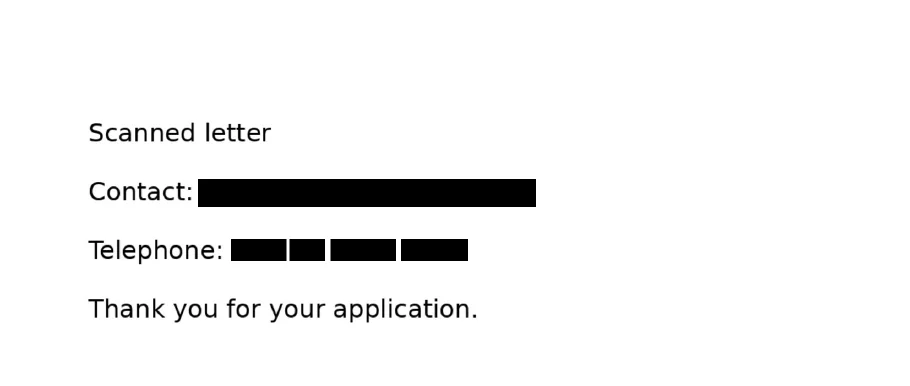
On a scan with no text layer, the tool flagged the page, read it on the device, and found the email address and phone number.
Keep a record of what was removed
The downloaded report listed each redaction with masked values only: no full email address or name in it.
Shrink a PDF under an upload limit
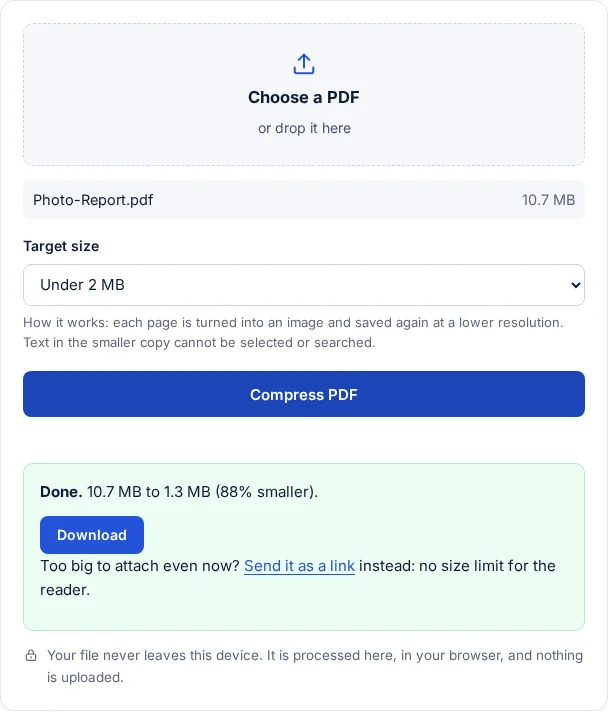
A 10.7 MB photo report came out at 1.3 MB with the “Under 2 MB” target, still 4 pages.
Send several PDFs in one locked zip
Two PDFs went into one AES-256 zip. 7-Zip refused the wrong password and opened it with the right one.
In every run, the browser’s network log showed no request carrying the file. The work happened on the device: nothing was uploaded, and no account was needed.
Where the free tools change your file
Three of the tools work by redrawing pages. That matters for some documents.
- Compress PDF turns every page into an image. The test output had no text layer at all, as the tool itself warns. Do not use it on a file that has to work with a screen reader or be searchable.
- Redact PDF turns redacted pages into images. With “Keep the other text selectable” on (the default), the words that touch no box are written back as invisible text, so the rest of the page stays searchable. Pages without redactions stay as they were.
- Password and watermark tools rewrite the file. A PDF that already carries a digital signature shows that signature as invalid afterwards. FileSeen tested this; see the signing post.
What still needs a full PDF editor
The free tools above do not edit the text inside a PDF, build fillable web forms, collect e-signatures or turn a scan into editable text. Adobe lists those among Acrobat Pro’s tools. If a job needs one of them, a paid editor is the honest answer.
For locking, marking, redacting, shrinking, combining and zipping, the 10 runs above show the free route works, with the trade-offs listed.
How this was checked
- Prices: Adobe’s plans page and AI Assistant page, loaded from a US connection on 24 October 2026, with the page text and a screenshot kept.
- Test files: a 3-page agreement with a made-up name, email, phone number, IBAN and case number; a scanned letter with no text layer; a 10.7 MB photo report; three photos.
- Checks on each output: pdfinfo (password, pages), pdftotext (what text remains), pdfimages (pages turned into images), page renders (watermarks) and 7-Zip (zip encryption).
Sources
- Adobe Acrobat plans and pricing, checked 24 October 2026
- Acrobat AI Assistant, checked 24 October 2026
FAQ
Questions about this post
How much is Acrobat Pro?
Adobe’s US plans page listed Acrobat Pro at US$19.99 a month for the annual plan billed monthly on 24 October 2026. Standard was US$14.99 and Studio US$24.99. Acrobat Reader is free.
Can I redact a PDF without Acrobat?
Yes. FileSeen’s free redaction tool found and removed emails, phone numbers, an IBAN and typed words in a test, including on a scanned page. Redacted pages become images.
Can I compress a PDF for free?
Yes. In a test, a 10.7 MB PDF came out at 1.3 MB. Every page becomes an image, so text in the smaller copy cannot be selected or searched.
Are the files uploaded?
No. The network log showed no request carrying the file in any of the 10 runs; the tools work in the browser.